






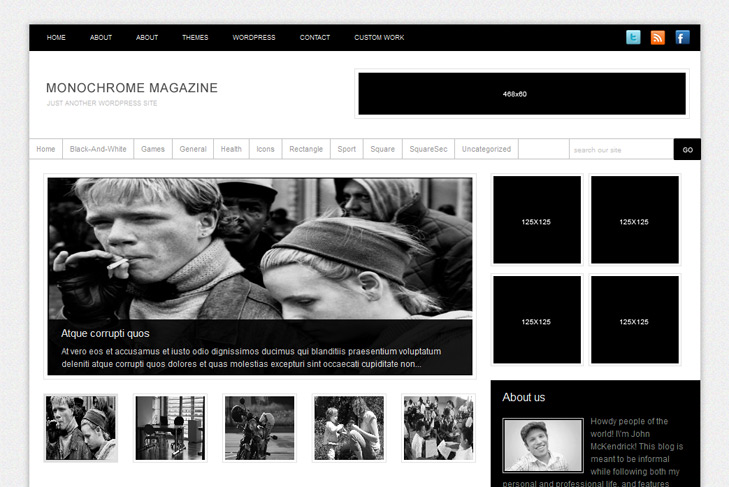
Demo Best hostingDownload (3778)
Theme Features:
- Content slider built in
- 468 x 165 banner slot
- 4 125 x 125 custom banner slots
- Banner positions can be turned off
- Theme Options
- Flickr widget
- Twitter widget
- About us widget
- Follow us (Facebook, Twitter, RSS)
- Post thumbnails (automatic image resizing)
- Page navigation included, no plugin required
- Google Analytics code script can be inserted
- WP 3.2 ready
- Readme included
- PSD Logo included
- Gravatar ready
- Threaded comments
- WordPress 3.0 menu system supported
- Cross browser compatibility IE7, IE8, Firefox, Safari, Chrome, Opera


Can you disable the slider on the category pages but not the home page? I tried removing the php but then the sidebar moves into the middle column. I also tried to hide the slider under theme options but the sidebar still moves. Any help would be appreciated.
Thanks!
Hi, you did something wrong. To remove slider from category, you need to delete this from category.php:
<?php if (get_option('swt_slider') == 'Hide') { ?> <?php { echo ''; } ?> <?php } else { include(TEMPLATEPATH . '/includes/slide.php'); } ?>I did that. It shifts the sidebar over. Here is my site with that removed: http://medmonthly.com/mywp/category/news-briefs/
Is there something else I can change?
No, there is something you could return in original state in sidebar.php. You’re calling banners outside of div id sidebar, and that’s why you’re having an error.
What do you mean by “return in original state”?
The sidebar.php is set up with banners outside the div if sidebar. If you put banners inside then the black sidebar is behind the banners like this http://medmonthly.com/mywp/category/news-briefs/
You’re right! This was a bug in a theme. I missed to add a clear when there’s no enough content. This is happening cause you dont have enough content in that category – only 2 posts. Sorry I thought you changed the code.
You need to add
to banners.php (includes folder) at the end. And then you can return also call for banners above div id sidebar. Im really sorry you lost your time cause of me.
All best,
Sinisa
OK, now for some reason that fixes the problem on for the category pages but on the home page the sidebar drops down. Looks great on my category pages though. http://medmonthly.com/mywp/
If you don’t have any ideas on this one I can always manipulate the CSS a little bit. Thanks for your help!
Please download theme again. I overlooked some things again. Not my day
Thanks so much for working on this with me! Hopefully this will be the last you hear from me
Sorry, it’s me again. I am having problems getting the slider to display my photos. I did exactly what you said in the read me. I created the custom field for my post and labeled them correctly but it doesn’t seem to be pulling the correct thumbnail and it doesn’t pull anything for the slider. If I set a featured image it pulls that image for both the thumbnail and the slider.
Any help would be appreciated.
Hi, no problems, as long as you have problems, Im here. I think I know why is this – images. Your images are really really big, and there’s probably some kind of a limit on image size that slider can run. You need to optimize that (big time!), resolution of image is at least 4,5 time’s bigger than it needs to be! If you have a photoshop, use it to resize image, in 800×600 let’s say, it should work.
I resized the images on one story to 72 dpi and 800 x 500 px but it still doesn’t pull the images. I can see it pulls the text though. I don’t think it’s pulling the correct thumbnail either because they are distorted. If I set a featured image then it uses that for both the thumbnail and the slider and then they are both distorted. Other than just created a custom field on the post is there anything else I need to change?
I can get the slider to use the image if I set a featured image but then that image is used for both the feature and the thumbnail. I thought if I set up custom fields then it would use those images to populate the slider. Please help.
Hi again, small thumbs are made to use featured images, but you can modify that, like this in slide.php:
The same thing you can do with big image.
Now, you can even set different images for slider – for big image you type bigimage in custom field, and for small thumb – smallimage.
Hi,
Thank you for this stylish theme!
I would like to know if it is possible to slow down the slide?
Thanks!
Yes, open up slide.php from includes folder and increase 3000 to what you want.