






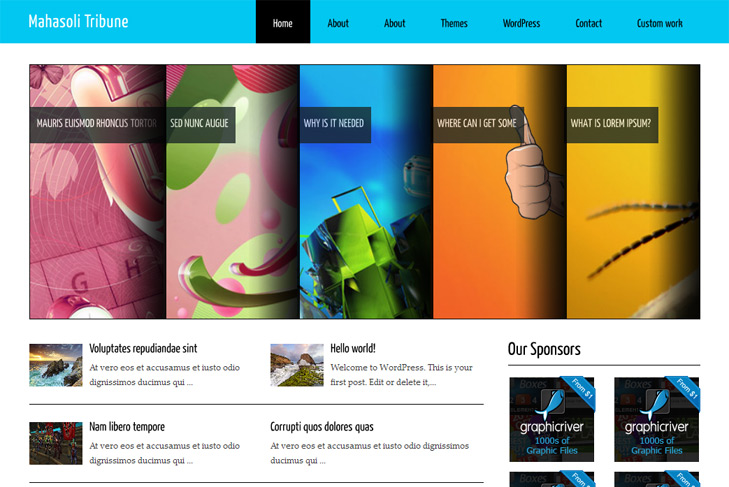
Demo Best hosting Download (13716)
Theme Features:
- Content slider built in
- 4 125 x 125 custom banner slots
- Banner positions can be turned off
- Theme Options
- Flickr widget
- Social Bookmark Widget
- 2 Columns
- Pages menu
- Exclude pages menu option
- Post thumbnails (automatic image resizing)
- Page navigation included, no plugin required
- Google Analytics code script can be inserted
- WP 3.0 ready
- Widget ready
- Readme included
- PSD Logo included
- Gravatar ready
- Threaded comments, Trackbacks & Pingbacks are separated
- WordPress 3.0 menu system supported + backwarkd compatability
- Cross browser compatibility IE7, IE8, Firefox, Safari, Chrome, Opera


Special area “Slide” feature, despite not using a “kwicks” What is it not working?
Hi, if you’ve selected sliding category, and did everything as I said, and still doesnt work, do this:
Create new category, name it featured. Select it as sliding category in swt theme options. Add then all posts that you want to slide in this category too.
Or, make me admin account on your site, I’ll fix it.
If an e-mail address.
administrator to send information
I didnt get your email, send me via contact form in the top menu.
OK.
Hi,
I need some help please.
Althought I have done your explanations, unfortunately slide is still not working.
- I created new category
- selected it as sliding category in theme options
- I added new category all posts
But, i am using hostgator hosting company, and wordpress.
I copied images to
yapivedenetim.com/test/wp_content/themes/MahasoliTribune/images/…jpg
Where I did mistake?
Thank you very much.
Sincerely
Hi, I see that slider see’s posts, and thats good. Now you just need to add custom fields to posts that are in selected sliding category. But first, enable them (screen options) to show up under posts (see faq). Your images are not loaded, so you must add them in custom fields.
Thank you very much really! It is working now with images. Your explanations and fag in your site helped me. My mistake was to used non-english words!
I wish you success in your studies.
Thanks again.
No problems, we’re always here to help!
Its not your mistake, I recently figured out that our theme options is not working with non english chars (in cat names), and I never tried other language, never crossed my mind…
Hi,
I am using chinese social network platforms so i want to ask how can i change the icons under Bookmark us?
Thanks
Hi,
social icons are in theme/images/socialicons folder.
Thank you for the reply.
I also having trouble… how do you put read posts at the middle bottom with the “read more” area… hope you know where I am talking about.
Currently on my site I only see one post, which is my latest post…
Thx
Hi,
Im not sure what you mean by “how to put read posts”? You mean read more? If so, you need to insert read more tag where you want text to break. You can check faq to see what Im talking about.
Or please be more specific.
Please, how can I create a custom field in this theme? Do not exist this option in the post window, just one fixed called “image destaq”. Thank you
Hi Rafael,
you need to enable custom fields first. Its all in the faq, go to screen options, check it, and open a post then, it will be bellow.
Please help. How do I remove the “Mahasoli Tribune” name on top of the theme and replace it with my own blog title or text logo?
If you want to replace logo image, you have that in the readme, and in faq section in the menu.
If you want just to change to linked text instead of linked image, change this:
<h1><a href="<?php echo get_option('home'); ?>/"><img class="logo" src="<?php bloginfo('template_directory'); ?>/images/logo.png" alt="<?php bloginfo('sitename'); ?>" /></a></h1> to this: <h1><a href="<?php echo get_option('home'); ?>/"><?php bloginfo('name'); ?></a></h1> you'll have to style this in css, so open style css and add this: #blogtitle h1 { font-size: 22px; /*set what you want*/ } #blogtitle h1 a { color: #000; /*set color what you want*/ }I am having the same trouble. I dont understand how to change it. Please advise.
Just replace logo.png with your image from mahasolitribune/images folder.
Hello, good afternoon, the theme is fantastic, thanks for the contribution.
However I can not properly configure the theme to work.
isntructivo’ll have a manual or step by step through the configuration of the subject, thank you very much. regards
Hi,
there’s readme in themes folder, and there’s FAQ in the menu so check it.
hi,
thanks for sharing this theme, I will like to ask.
For the slider, i choose the categories but i do not want to post to appear, please advice. Please see my site http://truthseekingjournal.com/ It is pretty messy now.
How do i hide the post below? Thanks
Hi, there’s 2 ways of doing this.
1. You can add/replace this to index.php, category.php and archive.php:
Trouble is, cause you’re having enabled permalinks (seo), and I cant see the ID of cat in url. It should look like this: yoursite.com/?cat=48 (48 is the ID).
Or you can just google some plugin for hiding posts on frontpage, like wp hide posts or similar.
hi thanks for the reply.
I will try it out.
hi,
i have tried to use wp hide post plugin, but when i enable the “Hide in front page”, the slider picture will disappear too. May i know how to resolve this? Thanks
Then use first solution, just disable wordpress seo to get category ID.
hi thanks
it works.
Hi,
can i remove the “My sponsor” and “Bookmark”? how to do it?
Thanks and have a nice day.
You can disable that in theme options.
hi,
may i know how to i use the featured image to create a summary, just like the demo you have? u can see my site http://truthseekingjournal.com/. It just come out 2 images. How i can make it to have only the summary?
Hi, for this check the faq – “How to prevent full post from showing up on the frontpage?”
This is how it works – you set a featured image – that one will show up on the frontpage, but not on single. If you want the same image on the single, better insert it through editor, on classic way. But, before this image, click insert read more tag.
So, add featured image, add text, then read more. After read more, insert image on the classic way.
Thanks for the reply.
HI,
can i set the slider link to a category instead of a post? Thanks
Well, this is tricky if you dont know how to do it. I dont have time to write that code, and explain that, sorry.
hi,
how do i hide the post and just display the summary? Thanks
Read comment above.
hi,
how can i arrange the slider image to what i want?
You just set whatever image you want in the custom field.
hi,
how do i create the post summary that is with the picture and date and comments?
The example is like the demo (the one just above the bottom widget). Please kindly advice. Thanks
You mean featured posts? If so, select featured category in swt theme options for latest posts and it will work (and number of items).
If you want to add a date there, sorry, there’s to much to explain.
hi,
how do i create a drop down menu? Thanks
Hi, I cant really explain you that, but google for some tutorial, you’ll find something.
I am facing problem with the slides. I have followed the steps you have suggested in the first solution , but still no luck. Any help will be appreciated.
http://www.innovatrix.co.in/priyajit
I see you got one working. Just do the same slide – image link in custom fields, for the other posts.
please tell me how to change the font of MahasoliTribune theme>>>>>>>>> in css its just change the font of body but its not effect header and headings titles.
Hi,
open up header.php and remove this:
<script type="text/javascript" src="<?php bloginfo('template_directory'); ?>/js/cufon-yui.js"></script> <script type="text/javascript" src="<?php bloginfo('template_directory'); ?>/js/Yanone_Kaffeesatz_Regular_400.font.js"></script> <script type="text/javascript"> Cufon.replace('h1',{hover: true})('h2',{hover: true})('h3',{hover: true})('h4',{hover: true})('h5',{hover: true})('h6',{hover: true})('#top li a',{hover: true})('.description',{hover: true}); </script>Then you can change fonts in css however you like.
I’m having trouble with the slides…I tried everything but it doesn’t show pics….help is much appreciated!
Please check the faq on our site.
I already read it…I added a featured post, enabled it in screen options, made a category ‘featured’ and set it as sliding category, the link is correct in the featured post, I also have a featured image (the same) ..so I did everything that is in the faq. There is also an error on the homepage:
Fatal error: Cannot redeclare wp_pagenavi() (previously declared in /public/sites/www.comei.nl/wp-content/plugins/wp-pagenavi/core.php:12) in /public/sites/www.comei.nl/wp-content/themes/MahasoliTribune/includes/wp-pagenavi.php on line 181
I’ve changed nothing in editor so can you please help me out?
For the error – just disable wp pagenavi plugin, cause theme already has it built in.
Try 2 more things – create new category, name it test. Add all slides there.
The second thing – make sure you wrote in custom fields slide, not slider or similar.
Thanks For Great Themes.
The site was very beautiful!
Wooww Thanks a lot!!!!! It’s working!!
Thanksssss!