






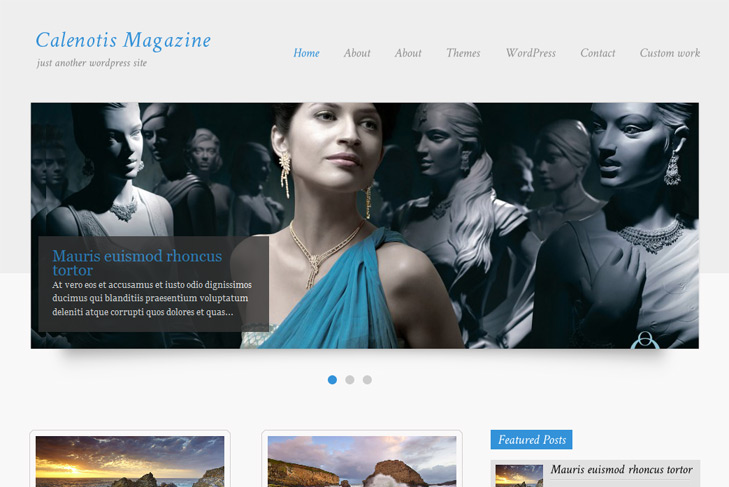
Demo Best hosting Download (22022)
Theme Features:
- Content slider built in
- 4 125 x 125 custom banner slots
- Banner positions can be turned off
- Theme Options
- Social Bookmark Widget
- 2 Columns
- Pages menu
- Exclude pages menu option
- Post thumbnails (automatic image resizing)
- Page navigation included, no plugin required
- Google Analytics code script can be inserted
- WP 3.0 ready
- Widget ready
- Readme included
- PSD Logo included
- Gravatar ready
- Threaded comments, Trackbacks & Pingbacks are separated
- WordPress 3.0 menu system supported + backwarkd compatability
- Cross browser compatibility IE7, IE8, Firefox, Safari, Chrome, Opera


Hallo! I’ve been unsucessfully trying to find readme.txt file for instructions. Is it available for free theme and where can I find it? Thanks!
Hi, its in themes folder
Hi there,
your theme is not too bad
But I don’t get my pulldown menu to work although pages exist, hierarchy is configured, no menu marking as “there are menu item down here”! The gallery is not that sophisticated …
Another key question: Is there any support for all the free themes which seems to be necessary…?
Best regards,
Klaus
Hi Klaus,
dropdown menu is not supported by this theme, sorry. Support is here as you see, just little busy with this site redesign, and didnt make to check all questions.
Hello. Thanks for the lovely theme, but I can’t get it to show post summaries on the home page. It just shows the full text of the post. I didn’t see anything in the read me about it either.
Hi,
please check the faq, there’s an explanation with image.
“How to prevent full post from showing up on the frontpage?”
can you link me where to find this FAQ? I am having the same problem and can’t find a link to the FAQ or see anything included the theme package…thanks!
It’s in top menu of our site
Hi; how can I change the color of the text over the slides?
Thank you.
Hi,
you can do so by changing slide.css from css folder
.tit { color: #3392D9; /*for title, change to what you want */ font-size: 22px; } and #slider .desc { color: #FFFFFF !important; /* for text color */ font-size: 12px; margin: 0 0 0 0; padding: 0; }I’ve downloaded your theme and it’s good!!
I’m building my website with your theme but a strange error message appears when I open some of the pages built…
Look here – http://www.basilicatapostopost.it/basilicata-post-to-post/
Where’s the problem?
Many thx
Looks like problem with permalinks. Try to reset them.
AAHHH! I’ve tried to modify the footer and the theme does not work anymore “This theme is sponsored, all links in the footer should remain intact” (Iwas just trying to put a link for contact…)
I’ve replaced the footer.php from the downloaded dir but it is still down!! HELP MEE PLEASE!!
Well, the footer is not the only thing you’ve changed, right?
Cause it would work if it was only footer. Replace whole theme via ftp, that’s the solution.
Hello,
I do not arrive has to set up the slideshow or to put the images and how the chercger thank you thank you
thanks
If you’re asking how to put images in the slider – check the readme, faq, and it’s written in theme options under slider settings.
Hy guys. I don’t remember changing anything in the theme, but my slider just started showing nothing… I have set category of the post to be shown, I have one category like featured where I put all my posts and that is category I’m using for my slider but since this morning my slider is blank. What do you think, what could be the problem? Maybe new wordpress version or something else? Did anyone else complained about having blank slider? Thanks a lot in advance!
Hi, well lot’s of people are talking about blank slider, but for a wrong reason. They dont do something as they should, and then they say that
Can you post your url? Double check your category name, is it selected in theme options, and custom fields. And use non english chars when making category. If nothing, maybe the quickest solution would be to make new category, and assign all slider posts to it. Then select it in swt theme options as default.
Hello,
How can I change the speed that the slider changes images at?
Answered my own question:
slide.php
pauseTime:4000,
I am having an issue getting the slider to work. I have looked at the readme.txt file, but it still is not working like I want it to. The content of the post is the only thing that pops up for an image.
You’re not doing something correctly. Probably custom field with image. Read the faq.
the slider of my site does not display image, you could take a look in my control panel?
http://www.freerunner.com.br
user: admin
password: die9837keu
Thank you
Hi mate, sorry I tried. I dont speak your language, you made 2 slider categories, both with the same names, and I got no time to fix everything. Start from zero, read the faq, read the readme in themes folder.
I’m getting, it’s getting cool. Thank you friend!
Look: http://www.freerunner.com.br
Hi, I started to use the Calenotis theme and everything worked fine until this morning, the Featured Posts section does not show anything anymore. I tried to change the Category and it works for some categories (eg. customers) but not with any of the ones i want (products, product lines…). I tried to create new categories and put there the posts i want to feature but still nothing. FYI if related, this issue started to show up just after i updated the advertisement menu (our sponsors). Thanks !
Hi, you might want to read faq. There are described problems, so please compare your settings with what I wrote in faq. Category name, english chars, cat would be the best if it’s one word etc…
Fixed !! My error was to put a category Slug name (product) different from the category Name itself (products). Both must match perfectly.
Also the other categories i tried on for the “Featured Posts” didnt work either because they were Sub-categories of Products (where i made the Slug name mistake)… We learn everyday !
Thank you. And again, you are doing an amazing work building those gorgeous themes
Great, good to know that! Thanks for posting fix.
Hi everybody,
I use this theme in my WordPress installation. Now I would like to show in home page only the post of a certain category. Normally the theme show all the post, without filter.
Can you help me?
Thank you in advance.
You have to change this in index.php:
<?php while (have_posts()) : the_post(); //to <?php query_posts('cat=CATID&showposts=5'); while (have_posts()) : the_post();Cat ID is ID of your category. You can click on category, and if you dont have SEO enabled, you’ll see in the url cat id.
Hi
I don’t know why but i’m having troubles with Serbian cyrillic.
I didn’t go further cause i stucked at the main nav. When i tipe menu items in cyrillic they don’t show up. With Latin everything’s Ok.
Don’t know why is that?
Thanks
Hi,
font in the menu is Crimson Text, cyrillic is not supported. Big majority of font’s only support latin, and there’s the trouble. Open up header.php and remove this:
(‘#top li a’,{hover: true})
Then you can set your font family for #top li a in style.css.
Hi,
Iam using your theme calenotis and i like it it is really a great theme,
i have a question however, is there a way to remove the little dark text field in the slider? the one that gives a description of the post.
i hope you inderstand what i mean, thanks in advance.
Hi, the easiest way would be just to add this to style.css:
.nivo-caption { display: none; }i have just added it to the style.css but it doesn’t work?
any thoughts about what iam doing wrong?
Could be browser cache, try clearing it first. Second, add that code at the end of the file. Last thing you can do is to add !important before “;”.
its really wonderful theme for ever , for the past one year i am using this theme , everybody told that ware you get the theme and say its really looks like wonder , so friends ,,, if you clearly have a knowledge about it sure its a right theme for yours
all the best
as ramanan
President Tamil Nadu state
students wing
Human rights organization
Hi, I know this post is old, but I try.
I have installed this awesome theme in local, and in online website to see it better.
But I can’t see the image called ‘header.gif’ working, so the top is only white instead of grease color.
Everything works ok, except that. And the theme is too white without this grease color on the top, around the slideshow area.
Any idea?
Thank you so much.
Are you sure you you have that image? Maybe you deleted it?
You can try reinstalling theme.
Thanks for your quickly answer.
Yes I’m sure I have that imagen at both places (local and online) but it dosn’t work. I have no idea.
Thank you so much anyway.
Give me your url.
Hi, I’m using your great theme Calenotis and everything is working as expected except one little thing. On the main page, a code appears when I hover over the slider image (i can read “span class=’tit’ etc.. and then the first lines of my post). It’s very annoying and unprofessional, I checked and your demo site does not have that text when i hover my mouse over the slides.
Can you help?
Thanks so much for your great work
I think you’re missing an image there. Take a look at demo: http://simplewpthemes.com/demo/theme/?wptheme=CalenotisMagazine, is that happening? I don’t see it, so you probably done something wrong.
Hello!
I’ve read all faq, but I’ve still a problem with slider.
I check the category – http://prntscr.com/vanig
and in the settings of slider – http://prntscr.com/vanod
I feeling in the custom field – http://prntscr.com/van20
I try to delete all the categories – not working((
Help me, please…
Hi Julia,
category name is the problem. Open up slide.php from includes folder and replace this line:
$my_query = new WP_Query('category_name= '. $slidecat .'&showposts='.$slidecount.''); with this: $my_query = new WP_Query('cat= '. get_cat_ID($slidecat) .'&showposts='.$slidecount.'');Thank you very much!!! Everything is ok!
hello! I downloaded your fantastic theme, but I’m encountering difficulties. For example I have WP 3.5 and I can not find custom field on screen option. can you help? I also have not figured out how to change the header? measures png / jpg and how to do .. thanks I hope for your help
Hi,
please check the FAQ on our site first.
For logo – find logo.png image in CalenotisMagazine/images folder.
See that measure, it can be bigger, smaller, see what fits you.
Just replace it with your own logo.png image.