






Demo Best hosting Download (5966)
Theme Features:
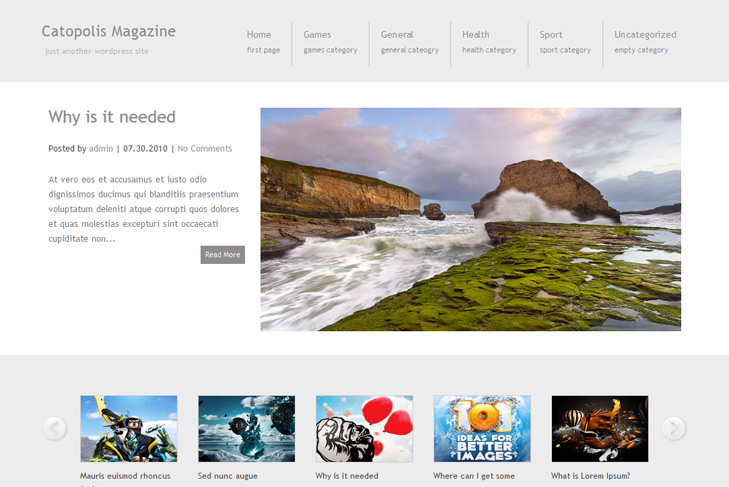
- Content slider built in
- Mygallery built in
- 4 125 x 125 custom banner slots
- Banner positions can be turned off
- Theme Options
- Flickr widget
- Social Bookmark Widget
- 2 Columns
- Pages menu
- Exclude pages menu option
- Post thumbnails (automatic image resizing)
- Page navigation included, no plugin required
- Google Analytics code script can be inserted
- WP 3.0 ready
- Widget ready
- Readme included
- PSD Logo included
- Gravatar ready
- Threaded comments, Trackbacks & Pingbacks are separated
- WordPress 3.0 menu system supported + backwarkd compatability
- Cross browser compatibility IE7, IE8, Firefox, Safari, Chrome, Opera


Hello,
Is it possible to place widgets in the bottom bar?
Thank you
There is no bottom bar, unless you add it.
I tried to change logo but it’s LOGO.rar not .zip and I can’t open it in Photoshop. Please help!
Its logo.zip, and it is in the folder. You need to extract files first, and then to open.
Is there an easier way to replace the theme name with my blog title? I don’t have photoshop. This is a gorgeous theme but I won’t be able to use it if I can’t put my blog title at the top of the page.
Hi, yes there is.
You can only replace logo.png from images folder with your own, but name it the same way, or edit header.php (search for logo.png and replace with name of your image).
thanks!!
Hello! I have installed this theme but I cannot get bolding to work in the blog posts. What is preventing this from happening? Thank you!
Hi, open style.css and at the bottom of the file add:
strong { font-weight: bold; }Thanks so much! That fixed it.
Hello Sin2384 – I have one more problem that I hope you can help with.
I’m trying to post a picture in a blog post, however, its putting the picture in twice. Once at a big size, and another at the size I set it to. How do I remove the top stretched photo?
This is what it looks like: http://i40.photobucket.com/albums/e204/quickstopclerk/top_stretched_photo.jpg
Hey Michelle, you need to set image as featured. Do this – delete both images (or one I guess in this case).
Set it as featured. Now, if you want to have another image, insert it, but after you insert read more tag.
Thanks for the info. However, when I make the picture the featured image, it still stretches it. Is there any way around this?
Only if you make image 625×340, then it will work. Dimensions are always tricky with some images, there’s no some unique fix for this, sorry.
Hi great time. Where it the .PO file for the translation ?
Thanks
Hi, there’s no PO file, theme is not translation ready, sorry…