






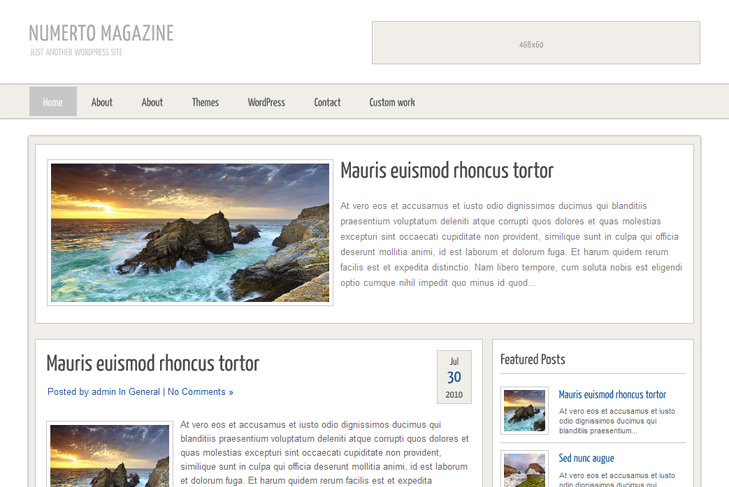
Theme Features:
- Content slider built in
- 468 x 165 banner slot
- 4 125 x 125 custom banner slots
- Banner positions can be turned off
- Cross browser compatibility IE7, IE8, Firefox, Safari, Chrome, Opera
- Admin Page Options
- WordPress 3.0 menu system supported + backwarkd compatability
- 2 Columns
- 5 Sidebars
- Pages menu
- Exclude pages menu option
- Threaded comments, Trackbacks & Pingbacks are separated
- Gravatar ready
- RSS ready, Twitter ready, Subscription ready
- Post thumbnails (automatic image resizing)
- Latest articles on category (can be turned off)
- Page navigation included, no plugin required
- Google Analytics code script can be inserted
- Social Bookmarks Widget
- Flickr Widget
- Widget ready
- Readme included
- PSD Logo included
- WP 3.0 ready


Elegant Themes
ThemesForest
StudioPress
Thesis Theme
Mojo Themes


Hi,
Good Job !!
I’m on WordPress 3.1 and the slidebar dosn’t work correctly (ok for post but not for images).
Do you have an issue for it ?
Thx
Hi, thanks.
BUT, you’re making mistake. Slider is WORKING! You need to set images in posts as featured. Please check out the readme how to do it.
This theme is beautiful. Thanks for sharing.
Greetings
Love your work – truly outstanding. Quick question – how do I slow down the slider? I’d like to set my own times for how long each image is shown. Thanks!
Nancy
Hi Nancy, thanks.
To adjust speed, go js folder, easySlider1.7.js, find: pause: 2000, and change it.
Thank you so much for the quick response – much appreciated.
Forgot to ask (sorry) – do I make the 2000 number higher or lower to slow it down?
Higher, thats the number of miliseconds. So, its set to 2 seconds by default.
Hi, Sinisa
How can I fill more menu items in the naviagtion bar, I dont want items come out of the naviation bar.Thank you!
Hi, to add items in the menu, the best is to set custom menus. Check this: http://www.youtube.com/watch?v=WkuHbkaieZ4
You can control with this number of items that it will be shown.
How to change my own font plz reply me. Thank!
Where do you want to change font? For titles, posts, widgets?
post title, posts , feature posts & slide …………..
If you want to change size, color, margins, paddings etc, you can find that in style.css under #sidebar h3 (widget title), h2.title for post title. If you want to change font family, you need to turn off cufon from header.php, delete lines from 30 to 34.
Thank you !
Hi,
Thanks for sharing this template it´s very good!
I was wondering how can I change the Favicon image?
Thanks a lot!
Hi, here you have all explained:
http://codex.wordpress.org/Creating_a_Favicon
Awesome theme – looks simple but super powerful under the hood.
I’m having trouble with the slider. I think I’ve followed the directions:
1. enable slider in theme settings. set category. set # of slides to 1.
2. create new post in correct category. add featured image per README.
3. create custom field called slide with value of url.
Big white box at the top of the pages. No content, no text, no image. Tried changing theme settings to another category but no luck.
I’m sure I’m doing something wrong – advice?
Hi James, Im glad you like it. Numerto is one of my favorites!
Problem may be in the name of category. The easiest way would be to create category “Featured”, and all posts that you want in the slider, add into that category too. So your post will be in 2 cats now, and select featured cat in sliding category. If this doesnt help, you can make me admin account (needs to be admin to access swt options), and send me login info via contact form. I’ll fix it.
Regards,
Sinisa
P.S.
You dont need to set custom field and slide for this slider. Its explained good in readme.txt, but I missed to make changes in theme options looks like….
Hi Sin2384
Thank you for the great theme….I’ve downloaded this theme and want to apply for my new blog….Can you show me how to resize the post thumbnails?
Hope to hear from you soon!
Have an awesome day
Mex
Wp will resize automatically, no need to explain. Or, you can just google how to resize image with photoshop.
Help! I’m new to blogging, and found your theme which is beautiful. How do I change the words “Numerto Magazine” up on top of the website? I can’t seem to find where I can replace that with the name of my blog…
Hope to hear from you soon..and thanks so much.
Hi, there’s explanation in the readme file, or check faq section.
Hi
I love your theme..great job. Is it possible to create a dropdown menu (I’m referring to the menu at the top of the page)? How do I go about doing that? I’ve looked into installing widgets such as suckerfish, but am not sure how to incorporate that into your theme. HELP!!!
Hi Rosalia,
it is possible, but Im currently busy, and I dont have time to style it.
Just google for some dropdown menu wordpress theme tutorial.
good topic, but I want to know if there is possibility to change the language, I want to change to Spanish
is much appreciated
You would need to edit all files manually.
The slider won’t work for me… (IE8/WP 3.2.1)
Have both featured image set and custom field; slide, with full url to picture
Getting the following error;
Message: Invalid argument.
Row: 116
Character: 165
code: 0
URI: http://www.myurl.com/temporary/wp-content/themes/NumertoMagazine/js/jquery-1.4.2.min.js
You messed something up. Do you see that kind of error on demo? Cause I dont have it in any ie that theme supports.
Lovely theme. I’ve checked Read Me file and FAQ page but don’t see the answer to my question. Does the navigation bar have a dropdown feature for nested pages?
Thanks!
This theme doesnt support dropdown.
The bookmark links and the social network links dont show up. They all show as question marks with a blue background, CAN SOMEBODY PLEASE HELP<<<<
This doesnt make any sense. Reinstall theme.
Im not very good at this and still learning Im still confused as to why it wont work for me. I added the custom field as slide then added the featured picture but its not showing at the top. Is this step for posts only what about the banner? I want the banner to slide can you help me.
my website: http://calvarychapelforney.org/
Thank you so much,
Stefeeb
Hi, for this slider you dont set custom fields, only featured images are required.