






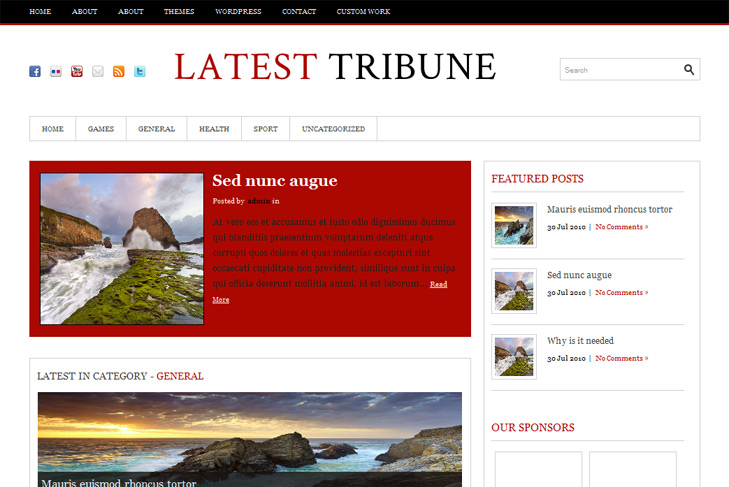
Demo Best hosting Download (5733)
Theme features:
- Content slider built in
- Mygallery built in
- Latest articles from categories on 3 positions
- 4 banner slots
- Banner positions can be turned off
- Cross browser compatibility IE7, IE8, Firefox, Safari, Chrome, Opera
- Admin Page Options
- WordPress 3.0 menu system supported + backwarkd compatability
- 2 Columns
- Right Sidebar
- Pages menu
- Category menu
- Exclude pages & category menu option
- Threaded comments, Trackbacks & Pingbacks are separated
- Gravatar ready
- RSS ready, Twitter ready, Subscription ready
- Post thumbnails (automatic image resizing)
- Page navigation included, no plugin required
- Google Analytics code script can be inserted
- Readme included
- PSD Logo included
- WP 3.0 ready


Hi – is there a way to make the text in the slider white? The black just isn’t readable. Thanks so much.
Nancy
Yes, open slide.css from css folder and change #slider p color property. Put fff instead of 222222.
Hey There – I could not find anywhere in the settings where to change the logo. Could you kindly let me know how?
Thanks,
A.
Look in the readme.
Hey there,
Two questions…how can I change the background color of the nav bar (Home, News, etc)? Also, I’m getting an error at the bottom of the page I can’t seem to get rid of.
“Not Found
Sorry, but you are looking for something that isn’t here.”
Can you help? Thanks!
Hi David,
you need to edit top.png image in order to change background of menu.
About search, you need to have at least one post on frontpage. What you have right now is featured post, and thats not the same. Or you can just delete this from index.php:
Sorry, but I’m confused. I do have a post on the front page (Food War), but I still get the “Not Found” error. Also, I’d like to have a single column and posts listed one after the other without the “Latest in Category – ”. Also with a longer text teaser (maybe 10 lines instead of 4). Having a second category is fine on the home page is fine (without the latest in category), but the post doesn’t show up. I hope this makes sense. ☺ Cheers!
Hi again,
you need to set number of posts to whatever you want in reading settings. If you dont, you’ll have not found error. If you want to remove featured posts, go to swt theme options and disable it. Do that first, see what happens with not found error, but you must specify number of posts on frontpage.
For the longer text on frontpage, regular posts (not featured posts) will display amount of text that you determine, by inserting read more tag where you want to break a text.
If you want more text in featured posts, you’ll need to increase 375 in featured-content1.php and featured_content2.php from includes folder (under truncate_post(375, true);
Hi, it’s me again. I’m having an issue with the image in the post. I’ve read the readme.txt file and adjusted the width to 150, but the image is not correctly displayed.
Does the theme support line breaks when displayed on the home page? The individual post looks fine, but the information runs together on the home page.
In Options under “Latest Posts From Categories”, when I select a category it doesn’t always show in display #1 and nothing ever shows in display #2. For some reason the “R&B” category will not display at all, regardless if it selected for display #1 or #2. If you look at the page, there are no posts displayed for R&B, however, if you click R&B from the category list, I have several posts in that category.
http;//www.themuzikroom.com
“Does the theme support line breaks when displayed on the home page?”
I dont get this. Nothing breaks, you just need to set normal featured image and it will be displayed as on demo.
What width you’ve set to 150? For post image, slider image, featured post image?
R&B category will not work cause of & sign. You need to set different name.
i agree with Angel Tzara that I could not find anywhere in the settings where to change the logo. Could you kindly let me know how?
Thanks,
It’s not in the settings, it’s manual replacement.
Check the faq on our site or readme.txt in theme folder.