






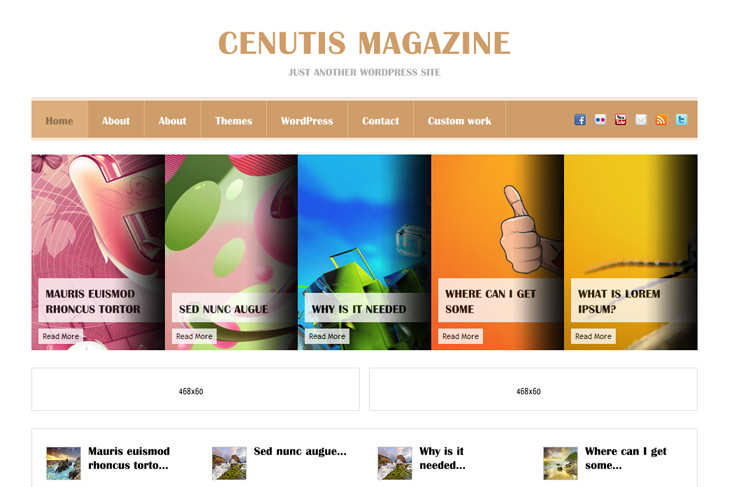
Demo Best hosting Download (8643)
Theme Features:
- Content slider built in
- Featured news
- 2 x 468 x 165 banner slot
- 4 125 x 125 custom banner slots
- Banner positions can be turned off
- Theme Options
- Social Bookmark Widget
- RSS ready, Twitter ready, Subscription ready
- 2 Columns
- Pages menu
- Exclude pages menu option
- Post thumbnails (automatic image resizing)
- Page navigation included, no plugin required
- Google Analytics code script can be inserted
- WP 3.0 ready
- Widget ready
- Readme included
- PSD Logo included
- Gravatar ready
- Threaded comments, Trackbacks & Pingbacks are separated
- WordPress 3.0 menu system supported + backwarkd compatability
- Cross browser compatibility IE7, IE8, Firefox, Safari, Chrome, Opera


Hey guys, love the template and works perfectly for what Im aiming for. Quick question, as of now, the slider will only show up if my homepage either dynamic, or on a static “posts page”. Is there any way by editing the php that I can make the slider appear on every page in the same position it is in right now? Not the most familiar with php, which is my only downfall at the moment, so any help would be great!
P.S. – Keep up the great themes, you’ve got my vote! =)
Ben
Hi Ben, thanks.
Yes, it is possible. Open index.php and copy code from line 3 to line 5, and paste it in single.php, page.php, archive.php after get_header().
Literally after overlooking the php files for about an hour now, figured it out on my own. I’d have to say 15 minutes ago. Appreciate the response though.
Demo is not working?
Site was transfered to another hosting, you caught up in the middle of the process probably
Hello,
I was wondering if there was any way to use a page instead of a post in the slider.
Thanks!
Sorry, no.
Alright, I’ll just hardcode it in then. Thanks for getting back to me quickly!
For the benefit of those who want to hardcode the top links to pages, or really any website at all just edit “ul” in the slide.php file to look something like this:
Main Title Read More
Each “li” represents one of the top sliders.
Hah, and I guess I can’t post HTML in this comment thread.
No, sorry
Hard coding can be done as you told, in slide.php, like pure html.
But, easier way would be to modify php call for posts, and put for query for pages, like here for example:
http://wordpress.org/support/topic/how-to-retrieve-multiple-pages-using-query_posts
You would need to know id’s of your pages and that should work.
Hello,
there’is a way for resizing automatically the image of the slide. Or anyway wich size must ahve the picture?
Thankyou
Daniele
Slider will resize them, no worries. You just make sure you have similar size like on demo, lets say 600×300.
Added the theme of CenutisMagazine but in admin part I can not add a photo to the category, there is not such button. Did I put a theme only, can it was necessary to govern file inwardly php?
Help!
You dont put photo to admin part, you have to add it to the post part
But first, in top right corner – screen options – enable custom fields. Follow the readme to see the rest.
Hello, could you please tell me how can I change the title name (header) to my website name. I didn’t find any possibility for this. Thanks, Kate
Please check the readme, how to change the logo.
Hi,
Looking to use this as the baseline for my site theme. Any thoughts on putting a tabber in place of the second featured post area (under the advert’s)?
Many thanks!
-Andy
Hi, well this is tricky cause of order of widgets that you want.
But you can, although it requires to edit sidebar.php. You would need to add something like this:
<div class="side-widget"> call for tabber function here </div><?php if (get_option('swt_banners') == 'Hide') { ?> <?php { echo ''; } ?> <?php } else { include(TEMPLATEPATH . '/includes/banners.php'); } ?>All you need to do is find appropriate tabber (plugin/widget) that can be called like this. Code should looks something like this:
<?php if (function_exists('tabber')) { tabber(); } ?>I love this theme! Is there a way to add a blue background?
Yes, in style.css under html body change background.
Can I add color to this theme?
Why do I have the full post in home page?
I want just some lines in home and visitor must click the “read more” to show the rest.
I don’t found where configure it. Can you help me?
tkz
(the link: http://www.showit.art.br/soul/)
Insert read more tag where you want your text to break.
Hi, love the theme. Was wondering if you could help me out.
The query about using a page instead of a post in the slider. You did explain that earlier, but i got a bit lost. Could you explain again, not terribly hot on this stuff? Many thanks
You should change in slide.php this:
$my_query = new WP_Query('category_name= '. $slidecat .'&showposts='.$slidecount.''); to $my_query = new WP_Query('post_type=page&orderby=menu_order&showposts='.$slidecount.'');why the function “Featured image” does not work?
http://markjaquith.wordpress.com/2009/12/23/new-in-wordpress-2-9-post-thumbnail-images/
thank you
It is working. But I use slightly different method, images are not cropped, but resized.
Hi,
I’ve just installed this amazing theme (I am using wp 3.1.1)
However, I think there is a bug in the “featured news settings” theme option.
Indeed, whatever category I am setting there, it always display the posts from the category set in the “sliders settings”…
Any idea on how to solve it ?
Thanks
Hi, thanks for reporting this. You were right, there was a bug. Please download theme again, it’s fixed.
Hi,
I have send a comment few days ago but I haven’t had the chance to get an answer (probably my message was not sent properly…)
I discoverd another bug in this theme.
In the section “SWT Theme settings” : in the “slider settings” tab, whatever number of slides I am settings there (for instance 18), it always display a maximum of 5 slides in the home page…
Could you please fix this bug (and I am sure you will regarding your previous quick bugfix). It’s really important regarding the content I want to display.
Thank you
Slider is set to maximum 5 slides, it’s not styled for more or less. Bug is that I forgot to delete that part in theme options, that shouldn’t be there at all.
The images I’ve put into the slider are “stretched”… is there an ideal “starting size” image or ratio, so that the slider images don’t get stretched? Or is there another setting or something I’m missing?
Well, image size should be 600×280. Try that.