






Demo Best hosting Download (11114)
Theme Features:
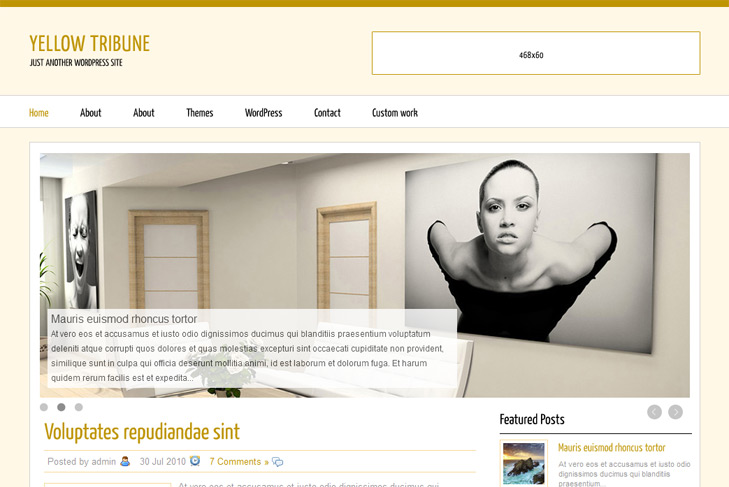
- Content slider built in
- 4 125 x 125 custom banner slots
- Banner positions can be turned off
- Cross browser compatibility IE7, IE8, Firefox, Safari, Chrome, Opera
- Admin Page Options
- WordPress 3.0 menu system supported + backwarkd compatability
- 2 Columns
- 2 Sidebars
- Pages menu
- Exclude pages menu option
- Threaded comments, Trackbacks & Pingbacks are separated
- Gravatar ready
- Social bookmark
- Post thumbnails (automatic image resizing)
- Page navigation included, no plugin required
- Google Analytics code script can be inserted
- Flickr widget
- Widget ready
- Readme included
- PSD Logo included
- WP 3.0 ready


Hi,
I downloaded YellowMagazine 1.0 and when I go to “Manage Themes” and press ” Preview” I see nothing……blank page
Why?
I had the same problem as well. As soon as I click “Activate” theme, the whole wordpress system crashed. I can’t view anything on my blog. It’s empty!!! Whyyyy???
Please help. Thanks.
I’ve replied bellow, but I dont have idea how this is possible. Did one of you tried to install this theme on localhost, do you have the same error? If not, can you make me test account on your blog to see myself why this is happening?
You can send me on email, via contact form in top menu.
I think maybe this problem in Hosting provider…
here test site – http://dinfo4u.com/ with this theme – it’s OK
But here (other hosting) – http://forex-shop.com/blog/ with your other theme “LacontiseTribune 1.0″
Here I could NOT install “Yellow Magazine” and “GerrilaMagazine 1.0″
Yes, that could be the only explanation. Maybe even something with permissions.
Hi Vadik,
probably bad internet connection at the moment, or server was too busy, that caused delay, and error at the end. Preview is working 100%, I’ve just tested it. You can always activate theme to see it as you should.
good day
I’m from Brazil
I am wanting to make a site a real estate agent and found these interesting Themas by having a system of slides and smaller images along with text.
So I’m with a problem that already have a few hours I am trying to solve more I can not find the solution.
Know me know how do I insert images on the slides at home page?
Ja fiu in Appearance> SWT OPTIONS and I have done everything and still I could not know how to insert images or text on the slide Main Theme.
The themes that I edit are tendano \ blandit Magazine \ and \ Kalix Magazine \.
PLEASE NOTE I thank you for.
Ekilson Vilela
Please follow the readme, I’ve told 100 times how to insert pictures in the slider. Select sliding category, number of posts, add custom field named slide and leave link to the image on the right side – check the image:
http://www.simplewpthemes.com/howtoslide.png
To do well the slider animation.
1. I send to themes/YellowMagazine/images/ 4 images scaled at 930×350.
2. i selected in the SWT options 4 slides.
3. Then, I select Uncategorized to do appeared in the all site.
4. Then, i add into my post #1 an custom field: slide and the adresse of the first image.
5. then, i add into my post #2 an custom field: slide and the adresse of the second image.
6. i repeat for the 4 images.
7. i select in the SWT options: DISPLAY.
8. it is not working at all.
since one week, i check all the step, i dont know what i doing wrong.
I hace no plugging/extension with Jquery.
I really want to make ot appear, with some customed text.
Is it possible to help me?
http://torildartistes.com/wp/
Not sure whats the question except that slider is not working, as usual. Images are missing in your blog, like there is no call for them. If jquery is the problem, try installing google libraries http://wordpress.org/extend/plugins/use-google-libraries/.
I dont know what kind a custom text that should be?
If you sent images to themes folder, they might be unreadable. Try accessing them directly, to see is it possible.
The images are in the main folder:
http://www.torildartistes.com/image1.jpg
http://www.torildartistes.com/image2.jpg
But it is not working… i still work on it…
It IS working today.
I dont really know why but my slider works! I put my images in the main folder.
Just a little question before leaving: iis it possible to keep just one animation in the slideshow: where modify code fot it?
@Jul
Yes, you can just choose one image in swt theme options. Only one image will appear.
so sad,
I tried to change some SWT Theme Settings. And add some news photos for the slide. It crashed. No more images at all. Even the former, and i don’t know how to do to restart my slide because can’t find my pics even i checked their adress.
Help me please?
Is category with new images named with first small letter? If so,
try making new one with first capitalized. But now I see you got it working?
I’m trying to set up this theme and I was wondering how to change the font? I have a specific font that I want to use for it instead of the one that’s included. How can I change this? Is it even possible? Thanks!
Hi Lauren, yes it is possible. Check this tutorial – http://davidwalsh.name/cufon,
and after you generate .js file with cufon generator, upload it to yellowmagazine/js folder, delete Yanone_Kaffeesatz_Regular_400.font.js, and in header.php change Yanone_Kaffeesatz_Regular_400.font.js with name of your file. Thats it.
Hi,
I have 2 questions, first, is it possible to invert the slide order? Or playing slide based on post date.
Second, I have problems with tools like Fancybox or LightBox, none work with this theme, I think that’s deal with Jquery but any idea of any plugin like this working with it?
Thank you, and good job!!
Hi MOX,
for ordering by date, you should edit line 19 and add parameter for date. Try searching ordering by date wordpress on google, Im sure you’ll find something.
For the fancybox, Im not sure why. Try to remove in header call for jquery. Its on line 29, and let me know.
Hey,
How do you change the name, Yellow Tribune? Tried to go through settings -> general -> site title, but it doesn’t work..?
On a second note, you got some cool stuff going on. How much do you charge for making a customized theme?
Thank you,
Klipsun Online Editor
Hi Klipsun,
for the theme name, you have all written in the readme “How to change logo”.
We’re not working customizations currently.
Regards
Hi,
I’m coming back here, because I can’t find where is the code for the comments, I would like to add some code for an auto-login facebook. I tried to modify comments.php but it doesn’t seems to be the good file, because renamed into comments.old on the server, the comments form still appears under the posts
Strange… Any idea I don’t find anything using a search tool!!!
Thanks
Maybe this will help:
http://www.ruhanirabin.com/integrate-social-networking-wordpress-using-facebook-connect-api-wordpress-plugin-tutoria/
Thank you, I have already done that, I just search in your template where to find the comments form to include my code, and the strange thing is that the comments form is not in comments.php, it’s another one used but I don’t find it…
Thanks for your help.
Thanks for your help! I have another question….is there a way to customize the text that goes over the image sliders? I’d like to shorten it to be just one sentence or maybe even customize a description. Is that possible? Thanks in advance!
Hey Lauren, yes it is.
Open slide.php in includes folder and find truncate_post, just reduce 350 to lets say 150 or 100.
Hi, since the release 3.1 the slide didn’t work anymore any idea??? Is it the same for you?
Mate, it is working. No changes were made in wp 3.1, so that slider wouldnt work.
Check your theme options, looks like your sliding category is not selected, cause images are not loading.
Thank you, I don’t understand why but the old categ “Présentation” wasn’t working anymore, I have created a new one “A la une” and now it’s work…
And it worked before and just stopped?
If so, it could be some cause of some plugin. Or if you renamed that category, Im not sure.
Hello Sin,
I’m so gratefull for your theme. Thanks a lot.I try now to improve the loadinf of the site. Indeed, at the beginning, the 3 images of the slider appear until it will be hidde by the div.
Do you have any ideas to improve the loading at the begginig and not to show all the image of the slidder?
Any plugin maybe?
Thanks
Jul.
Well, you could in slide.css (css folder) add overflow: hidden; in #sliderw, and add padding-bottom: 15px; too. I hope this helps.
You are the BEST, man!
Thanks a lot for everything, i just change padding-bottom: 22px, to let appear the full icons on the right.
Thanks a lot,
jul.
I suddenly started having trouble with my slider not working. When I had just a few posts in the category selected to show the slider images, it was fine. Now, I have about 4 posts in that category and even though there isn’t coding on those specific posts, the slider is picking up text from them and displaying that text without an image instead of the sliders that I had specifically put onto posts that I wanted. How can I fix this?
Hi Lauren,
Im not sure how this can happen. Fastest solution could be to make new category and all those posts with custom fields assign into that category. Then select that cat in theme options, see what will happen.
If nothing helps, make me admin acc on your site, send me login info via contact form, I’ll see what’s the problem.
Hi there,
im new to wordpress…so question: How to add a custom field in the post for the image in that will show in the slider?
Thanks
Hi,
check the faq.
Sin, thank you for your lovely theme.
I cannot seem to get my FEATURED POSTS to pull anything… What/where do I edit to make this work? Either in the dashboard or in the php files…. I feel like I’ve tried everything. –your ReadMe isn’t very descriptive.
Thank you in advance – Sin or anyone who can help.
Hi Libby,
probably the category name is the problem. Try name your category with single word, like featured, something that uses English letters only, and try again.
I can’t seem to get my ‘Featured Posts’ function to work. My category name is one word, like you reccomended previously. Any suggestions?
Write me the name of the category please.
Its called ‘reviews’ – without the apostrophes of course.
Can you make me admin acc on your site, I’ll have to login to see what’s the problem. Send me data on email via contact form.
Hey, thanks for the awesome theme!
My question is why the posts displayed on the front page are not being truncated. The full body of text is displayed on the front page for each post i have published. Any help at all is appreciated.
Just insert read more tag! Check the faq.
My Featured Post is not working. Slider, latest Post everything else is fine. Please help
Problem is most likely category name. Check the known problems with sliders in the faq, it should be more clear to you. Your category has to use english-only chars.
Hi,
I was wondering how to remove the “our sponsors” section in the side bar?
thanks for the awesome theme
Open up banners.php and remove it.
At first thank you for the beautiful theme! I’m having trouble with the featured posts. I can’t seem to get this function to work. The category name is one word as recommended – and I also used english-only chars. (The name is ‘general’.)
You’re not doing something correctly. What about custom fields, link to images? How you did that? Sometimes can be a problem if image is not hosted on same domain.
Hello there! I very much like this theme. It is exactly what I was looking for however, my husband tried to remove the link in the footer (yeah I know) and now nothing is working. I can’t even log in to wordpress. What should I do, besides from not letting hubby touch the computer?
Hi
You need to reinstall theme via ftp, re-upload all files and that’s it.