






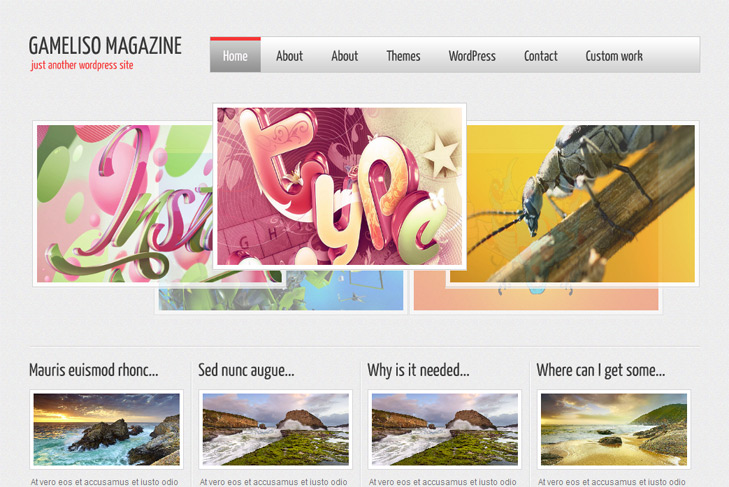
Demo Best hosting Download (23195)
Theme Features:
- Content slider built in
- Cross browser compatibility IE7, IE8, Firefox, Safari, Chrome, Opera
- Admin Page Options
- WordPress 3.0 menu system supported + backwarkd compatability
- 2 Columns
- 2 Sidebars
- Pages menu
- Exclude pages menu option
- Threaded comments, Trackbacks & Pingbacks are separated
- Gravatar ready
- RSS ready, Twitter ready, Subscription ready
- Post thumbnails (automatic image resizing)
- Page navigation included, no plugin required
- Google Analytics code script can be inserted
- Widget ready
- Readme included
- PSD Logo included
- WP 3.0 ready


I have Gameliso installed and really like it. I have a few questions however.
1. It says it is subscription ready. Is this for users to subscribe so that they can log in? Is there a menu option to show?
2. When I look at your live demo it shows much larger on the screen than mine. It takes up more of the whole page (wider) and the graphics are larger. Is there something I need to do to get mine to show this way?
3. All of the sections (news, gallery, top slider) pictures are automatically resized. Can this be changed or do I need to resize all my pictures before uploading to each category depending on where I want to put them (news, gallery, top slider). Some are distorted.
Please take a look at my site and let me know your suggestions.
THANK YOU!
Hi Andrea,
first, Im glad you like gameliso.
1. Subscription ready, I mean by that you have option to add your email and rss links, twitter button etc.
You have that options in theme options.
2. How do you mean on demo is larger, what is larger? If you mean on images in posts,
you should put images as “featured”. How to do that, read readme please in themes folder.
3. For resizing, depends what you need. Images are resized to fit as they should,
some of your images you may need to resize manually, thats just how it is for all of us.
Tip: try to find similiar size like on demo, then it will not be distorted.
Please feel free to ask, Im here.
Hello! This really is an awesome theme.
I am wondering though, does the images.php file in fact override other javascript in a post? My only issue so far has been that the slideshows and maps from one of my plugins will not display when using this theme. Is there a way I can let it pass through?
Hi Anna, I guess it does, can you give me the name of the plugin?
Hello, first I would say thanks to U for this great template, I just tried it at my localhost, and as soon as possible I would upload it into web hosting. Thanks so much…
But there is a little bit different between the live demo of this template interface and the interface at my localhost… The difference is when I see live demo, there are some postings listed at bottom, each posting has a red flag with date info above image of posting, but I see my localhost interface there is no red flag above the image posting, only image can be attached without red flag withou date info. So, how to show that red flag for each posting?
Hi, you just need to add images, exactly – set featured images for each post, and dates will show!
I’ve tried it dude, and it works…. Thanks so much
Very nice themes. Thank you for your efforts. I want to use them but the language of my site is Turkish which contains “ş”. The font skips that letter and gives a blank space. How can I solve this problem.
Hi Sebnem,
unfortunately, you cant
Some fonts just dont support those characters, and you cant do anything except not to use that letter. Its up to font, you can remove cufon-yui.js call in header.php, and line thats calling for font just bellow. But you’ll have to edit css to gain proper look, probably to reduce font size etc..
hi,
I’ve just installed your theme (i really like)
but it doesn’t show the option “new custom field”
(i am inside Theme options-> slider settings)
good work!
Ramon
PS: could be because i have wordpress spanish version?
ok i’m new on this, i found the solution for the question above, but i don’t know why it doesn’t work. The main slider just shows text, what am I doing wrong?
thank!
Hi,
Im not sure what you’re doing wrong, but slider cant show text! It only show images. Check the readme for theme usage instructions!
For custom fields – you should add something like this under your posts:
http://www.simplewpthemes.com/howtoslide.png
Remember, that post must be in selected sliding category, the one that is selected in theme options!
hi,
i found what i was doing wrong.. it was my english… finally i found how to do the custom fields. thanks! just one question, the slider i jsut for pictures doesn’t work for videos. am i right?
Nope, its made only for images.
Hello,
I’ve just installed your theme (i really like)
but it doesn’t show the images on the “carousel”.
How this component load images?
Tks!
Please read my comment above. You need to add custom field under post, that is under selected sliding category in swt theme options. In custom field under value, add value “slide” (no quotes), and on the right side add link to the image.
Thank you very much. You have been very helpful! Now I would like to know if the row with the arrows on the side can be put into a single blog page, other than the home.
Thanks!
Or a jQuery plug, can a plugin only work for one page?
If you mean on gallery with arrows bellow featured news, yes you can do that. Open index.php copy and delete everything from line 11 to 13, and paste that in single.php. Delete it on category.php too if you dont want it.
Thank you very much! has been very helpful! could you tell me if you can change the type “Yanone_Kaffeesatz” by another. I found a file called Yanone_Kaffeesatz.js inside the js folder. Thanks!
Yes you can. Go here:
http://cufon.shoqolate.com/generate/
upload the font you want, and insert in js folder. In header.php you’ll see call for yanone font so just replace yannone with name of new js font file.
This theme is delightful. Little by little I have figured it all out, with your helpful information, but I’m just hanging on one little detail. Might seem silly but is there any way to not display posts on the homepage? I have the posts created for the carousel and I just want them clickable from there, not actually showing up below it. Is this possible? Figured I’d asked before I started searching the CSS. THANK YOU!
I really love this theme. I would like to pay for it so I can get some customization and the links at the bottom removed as I will be using it for an ecommece website. How much would you like for changing the over menu color and removing the links? Please let me know.
Sorry mate, we’re not removing footer links, and we dont do customizations with that requests. Actually, we dont do custmizations right now at all.
Hi! There are two equal “Pages” and “Categories” boxes on the side of the posts, how can I change this so that there will be only one of each?
Also – when I downloaded the theme and installed it, the footer says: “Designed by Animal Care Jobs” with a link to http://www.animalcarejobs.net/ – is it supposed to be like that? I noticed that it’s not on the demo. (I downloaded the theme from another site than this one)
Ok, nevermind, I managed to remove the boxes myself!
Yes, it is supposed to be. Demo is updated now, sorry.
Boxes were equal just cause of look on demo, but as soon as you publish any widget in sidebars, they will dissapear.
Hi 2384,
This is a very nice themes!I just installed it, and it works well.
Now I have a few question however, could you please help me.
1. I have set the Reading to “Summry” , why it still show the Full-Text on the index page.
2. How to make it support Chinese characters
waiting for you reply, thank you very much!
Hi Garfield,
1. you need to insert read more tag where you want to “break” text on frontpage http://websitevantage.com/wp-content/uploads/2009/04/wordpress-more-tag.jpg
2. For Chinese characters, there’s no solution, except to turn off cufon. Delete this from theme in header.php:
Cufon.replace(‘h1′,{hover: true})(‘h2′,{hover: true})(‘h3′,{hover: true})(‘h4′,{hover: true})(‘h5′,{hover: true})(‘h6′,{hover: true})(‘#top li a’,{hover: true})(‘.description’,{hover: true})(‘.date’,{hover: true});
and lines 33 and 34 where cufon and yanone calls.
Thanks a lot!
Both problem have been resolved.
Again, Nice themes!
Hi there, I am also having trouble with the slider. It is at http://blog.magical.org.uk/
In the slider settings in admin I have selected “music” to be the category to be shown. However the page appears empty. When I change the category to “thought for the day” when I know there are no images uploaded, I see text as part of the slider. Please can you help? Please email me if preferred!
You need to set image in the custom field in every post of “music” category. Check the faq for that. And check how to enable custom fields if you dont know.
Perfect! I hadn’t realised I had to set every post to have an image. Thank you
Hi
I’ve just installed this theme on a test site I’m working on. I really like it with the content slider and layout.
Just one problem though, which is that the menu text, widget, title, post title and date in the red flag only appear in IE9 with compatibility mode enabled. Does anyone else have this problem. I’m just worried that our target audience are unlikely to know about the compatibility view and just think it’s broken. Opera and Firefox are both fine
Thanks
Tim
Hi, thanks for reporting that!
IE9 has problem with cufon file, and it’s replaced now. Please download theme again.
That’s amazing! Thanks for sorting it out so quickly. Much appreciated
Kind regards
Tim
This still does not work for me… and I reacently downloaded the theme…. I already have my website online, any ideas on how I can fix this?
Thanks
Hi, is there a problem with ie9 on demo? I dont have it. Or what’s exactly the problem?
i’m having this same problem on ie9 with my website, and re-downloading the theme didn’t help… here’s the link for you to see: http://wordpress.mindyjohnston.com/research/
i see that your demo works just fine in ie9, though.
thanks in advance!
Hi,
there was a problem with cufon file and ie9, cufon wasn’t supported properly, but it’s updated in the meantime. When you have downloaded theme? Tried the latest version?
hi thanks for this theme , its very good and suit for me .
but , i need to ask about some question ?
1- how ca i change my logo ?
2- how can change my valcon logo that fond beside the word live demo ?
3- how can i put photo in the first slider in this theme ?
sorry , i have many question but , i beginner in design and i really need help .
Hi,
1 – check the readme or faq
If so, google how to add favicon on wordpress theme
2 – you think on favicon?
3 – All photos are added the same way, whether you had one or 4 images. For that, check the faq.
Thanks for your reply
iam really thanks you .
but , all photo in MyGallery don’t appear or we can say they appear whit photo
you can see that in http://www.1234tools.com
Looks like you’re having joomla now. Anyway, I would help, but I cant figure the question.
Hi
Really love the theme and am hoping to use it on a site. Just a quick question about the footer – I know you want to leave the various credits and links in but is there anyway that I can just insert a simple bit of code like target=”Blank” so that the links open in a new window rather than take the viewer away from my site?
Thanks
Sorry, I cant explain you how to do that…
Hi,
I love this theme, thank you.
2 Question.
1. can I set the posts on the home page (those with the red flag) to show post of a specific category ?
2. is there a way to remove the red flag or chage to date to somthing else ?
Thank you
Hi,
yes you should be able to do that, you can try using some plugin, or directly to code into index.php. You should use query_posts function, and the best way would be (and easiest) to put all these posts that you want on frontpage into one category named for example frontpage.
Then, you’ll need category id of that category (which you can see in the url, like yourblog.com/cat=4 (4 is the id), and do something like this in index.php:
find this: <?php if (have_posts()) : ?> replace with this: <?php query_posts('cat=4&showposts=6'); if (have_posts()) : ?>Replace 4 with your cat id and change 6 to number of posts that you want on frontpage.
If you want to remove date icon, in index.php, category.php and archive.php delete this line:
<div class="date"><?php the_time('M d, Y'); ?></div>Or you can put different image as background, you can edit that in style.css under .date.
I can’t seem to exclude pages from the top menu bar – I tried entering the slug in the theme settings area where you can exclude pages and it doesn’t seem to be doing anything? Am I maybe doing something wrong?
You need to put ID of page there, not the slug. Slug is not even possible for pages. Better solution is to make custom menu, check some tutorial on youtube for that.
Hello!
Thank you very much for such a beautiful and EASY editable theme!
I have one question about the “carousel” that is BELOW the NEWS.
I’ve done everything – wrote the “slide” in the name, location in the value.
In the “theme options” -> “my gallery setting” I’ve choose the category and everything…
But for some reason the carousel below the NEWS doesn’t work.
Please check it (it’s a beta version, just working on it) – http://labellydanceacademy.com/new/ and may be you will have a solution for me.
Thank you very much!
Hi Katya,
for the carousel you need to type thumbnail not slide. That’s it.
I have tried everything to get carousel working. I followed instructions all the way. Stuck at this part, really hope you can help me with these two questions:
1. ‘You need to add custom field under post, that is under selected sliding category in swt theme options’….can you let me know where to find this?? I have looked everywhere in admin panel!!
2. ‘In custom field under value, add value “slide” (no quotes), and on the right side add link to the image’….can you let me know where to find this?? I have looked everywhere in admin panel!!
That’s why cause it’s not there
If you followed readme as you say you did, you would find it. You need to enable custom fields in the screen options (top right corner of dashboard). And you’ll see it under every post, not in theme options.
I tried to add another link to the footer and I think I messed something up because I just get a “This theme is sponsored, all links in the footer should remain intact” message but I am not able to go back in and edit the footer page. What can I do now?
Reinstall whole theme via ftp.
Hi!
I’ve just installed this theme and it works pretty well!
I would like to do a customization, but I don’t know if it’s possible. All the images has a brown border that I would like to take it off. Some images is at “png” format with a empty background, but this effect is ruined by this border.
What can I do?
ps: Sorry by my the bad English…
Yes, that’s actually a background image (behind the real image), and that’s why the border is not looking good. Find post_thumbnail in css, and remove the background. Then you can add a border, background-color etc.
Hi, Sin2384!
Thanks for your reply.
I’ve searched this “post_thumbnail”, but I didn’t find. In which file is it? All the “.css” files I have here is: “slide”, “reset”, “mygallery”, “gallery” and “comments”.
Can you help me?
Regards.
Style.css
Love the theme! I like the layout in the demo where you don’t see the sidebars. Is there a way for me to remove these or hide? Even when they’re empty I still see the blank backgrounds. Any help would be appreciated, thank you again for such a beautiful theme!
Hi, first Im not sure what do you mean by “I like the layout in the demo where you don’t see the sidebars” – cause sidebars are always displayed. If you know html and css, you can remove sidebars easily, no problems, but you’ll need to redesign – resize posts to fill the empty space. I cant help you there.
Love the potential for the Theme but could do with some basic advice. Where can I find the ‘read me’ file?
In themes folder.
Sorry to be a pain but this is all I have in the Themes folder so still looking for the ‘readme.txt’ file:
Current Theme
GamelisoMagazine 1.0 by sin2384
Free WordPress theme by SimpleWPThemes.com. Please read READ ME.TXT file to find out how to insert pictures in the slider and gallery!
Options:Widgets | Menus | SWT Theme Options
Any suggestions?
wp-content/themes/gamelisomagazine/readme.txt There it is. Anyway, you can check faq.
Found it. Thanks for your help.
I’m trying to add images to the home page carousel but when I create new post and select my category, I don’t have “custom fields” or “add custom field” anywhere on the “add new post” page. All I get “Categories”, “Post Tags”,”Featured Image”. What am I doing wrong?
Thank you for your help.
When I’m adding images to my blog posts they all appear on the home page. Is there a way to hide them from appearing there? I already have the featured image displaying. Thanks.
Yes, you can remove call for image display in index.php.
How can I turn of “Comment” box on all of the pages?
Delete call for comments comments_template() on page.php.
in the slide, I jsute text
But I put a link with custom field as non-slide, I also featured an image.
What art is not that correct?
You need to use custom fields for the slider. Consult faq on our site.
I have just installed this theme and was all excited to work on this but despite so many tries, the slider doesn’t work at all. I have added a filed called slider in the custom options and the link to the image as well. posted it in the category selected as the slider category but it just doesn’t show up.. no matter what i do.
Can you please help.
Many thanks
It’s slide, not slider. And check your category name, read faq on our site first (known problems with sliders).
Is it possible to add extra code to the functions.php without breaking the theme??
Yes it is, why wouldn’t it!