






Personal Wordpress themes /

Collection of free personal wordpress themes

|  

Genesis Framework for WordPress
Meraklis Magazine

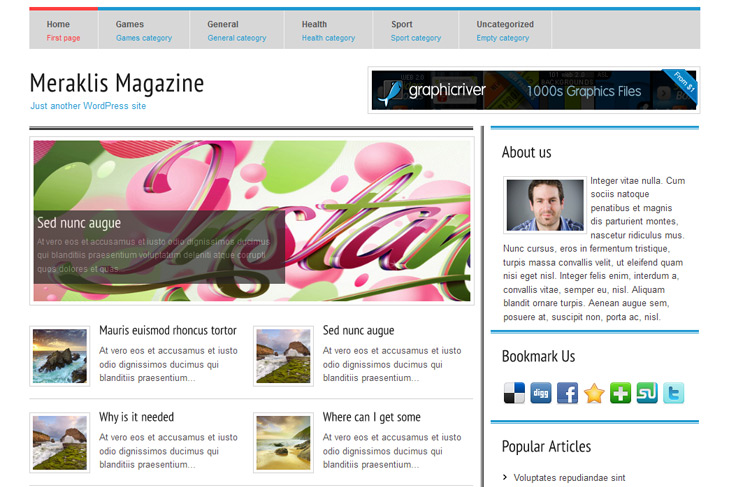
Meraklis Magazine free Blog, Personal Wordpress Theme

Best web hosting

Demo Download (7778)

Theme Features:

  1. Content slider built in
  2. 468 x 165 banner slot
  3. 4 125 x 125 custom banner slots
  4. Banner positions can be turned off
  5. Cross browser compatibility IE7, IE8, Firefox, Safari, Chrome, Opera
  6. Admin Page Options
  7. WordPress 3.0 menu system supported + backwarkd compatability
  8. Cufon fonts
  9. 2 Columns
  10. Right  Sidebar
  11. Pages menu with description
  12. Exclude pages menu option
  13. Threaded comments, Trackbacks & Pingbacks are separated
  14. Gravatar ready
  15. RSS ready, Twitter ready, Subscription ready
  16. Post thumbnails (automatic image resizing)
  17. Most popular (can be turned off)
  18. Page navigation included, no plugin required
  19. Google Analytics code script can be inserted
  20. Widget ready
  21. Readme included
  22. PSD Logo included
  23. WP 3.0 ready

23 Responses to Meraklis Magazine

  1. Daan van den Bergh on:

    Hi, I just sent this thru e-mail. But figured that this was the appropriate way to do it.

    Anyhow, here is my problem. I tried adjusting the bottom menu, through a custom menu as instructed. But all that is shown is ‘Home, No categories’. Nothing else! Then I tried adding a secondary menu function to the theme, but I got the message that I should leave the footer intact, even though I wasn’t even messing around with the footer.php file. Am I doing something wrong? Or is there something wrong with the theme?

    Please, help!

    Kind regards,
    Daan.

  2. sin2384 on:

    Hi, thanks for reporting. I forgot to add a line to functions.php, and thats why custom menu in the bottom didnt worked, only standard menu was loaded (categories menu). Please download theme again, and replace files via ftp if you still have that error message.

    Regards

  3. Aviatore95 on:

    Hi guys!
    I’m using this theme and I want to ask if I can change the menù at the top with a professional one!

  4. Aviatore95 on:

    How do I change the font color and type in the description in the slider? It’s a bad gray as default and I can’t read it very well and I need to change in white

  5. sin2384 on:

    Hi, I dont understand first question?
    To change slider color open slide.css from css folder, find .sliderImage span, and change color property.

  6. samozi on:

    Hi,I downloaded this great theme and installed it on my site:http://samozi.com/
    I have some problems on Chinese localization.

    First, the post’s title can’t display Chinese characters.only English letters can be displayed.We can only see “… Read More” on the index page,and nothing else.I googled this problem,edited styel.css,added”Microsoft YaHei” and “SimSun” in the font family,but it didn’t work.then ,I deleted “cufon” from the header.php, post’title showed up,but the font size and colour changed.and the post’s excerpt still isn’t there.

    Secondly. How do I change the sidebar’s title with Chinese? I mean, to translate the “About us”,”Our Sponsors” etc into Chinese?

    When I move my mouse to any post title,it shows “Permanent link to XXXXX”,How do I delete the “Permanent link to”?

    These are very urgent problems to me. Looking forward to hearing from you soon!

  7. sin2384 on:

    Hi Samozi,
    yes, cufon has problems with Chinese letters. Im not sure is it only about cufon, or about fonts, but I go with fonts.

    For post title, you need to adjust size in css, under h2.title. Its weird that colors is changed, but you can adjust it under h2.title a, h2.title a:visited.

    Post excerpt not showing? Do you have any content att all?

    For our sponsors, about us, and similiar, go into includes folder. You’ll find all files there, open them, and edit Our Sponsors to Chinese words.

    To delete Permanent Link to, open index.php and you’ll see that. Do the same for category.php, archive.php, single.php, page.php.

  8. Kevin on:

    I tried to edit footer.php because I want to replace “id=”home”>Home” with other language.But When I click save button,tragedy came,the whole theme stopped working ! telling me that the footer.php can not be edited.please help!

  9. sin2384 on:

    Hi Kevin,
    error should not happen unless you deleted footer links. Just upload and replace files via ftp. Btw, you can edit home to whatever you like, just dont touch links.

  10. Kevin on:

    But how to associate pages with categories? when someone clicks pages on the top, it can shows posts in categories?

  11. Ozimon on:

    does this theme support smilies?

  12. sin2384 on:

    Hi Kevin,

    not sure what you’re thinking, but I can tell you whats possible, what is not.
    You can mix categories and pages now, using custom menus. Google wordpress custom menus, you’ll see what Im talking about. When you click pages it cant show you posts. When you click page, it will lead you to page.

  13. samozi on:

    Hi, it looks like this :http://samozi.com/
    I can’t see any words in the featured cats,only the post title.Should I edit something? please help.

  14. sin2384 on:

    Hi again, maybe you should try like this:
    install limit posts plugin, and then open up featured-cats.php from includes folder.
    Find the line truncate_post, and replace that line with plugins line (should be something like the_content_limit(300, “”);). If this doesnt work, I cant help you.

  15. Traping on:

    Hi,

    I followed the instruction but, the slider didn’t work. Any suggestions

  16. sin2384 on:

    Yes, read again :) Samozi read my instructions, and its working on his site: http://samozi.com/.

    Select sliding category first via theme options. Open post, that is under selected sliding category, and add custom field like on howtoslide.png image in images folder. Add images to at least 2 posts for slider to start working!

  17. sanin on:

    May I hide “Popular Articles” on the right sidebar?

  18. Kevin on:

    after wordpress updated to 3.1,the slider was gone!

  19. Engell on:

    HI! I love your theme but I got some issues.
    1. I can’t change the name fot the logo
    2. I want to change the categories place.
    Thanks 4 the theme

Leave a Reply

Your email address will not be published. Required fields are marked *

*

You may use these HTML tags and attributes: <a href="" title=""> <abbr title=""> <acronym title=""> <b> <blockquote cite=""> <cite> <code> <del datetime=""> <em> <i> <q cite=""> <strike> <strong>

 
Wordpress Hosting

About Us

Simple wp themes is a collection of all wordpress themes made by authors of this site. All themes are free to use.

Latest Tweets

  • Loading Tweets..
Follow us on Twitter
  • U-Design WordPress Theme
  • Modernize - Flexibility of Wordpress
  • Karma - Clean and Modern Wordpress Theme
  • Doover Premium WordPress Theme
  • Good Space - Responsive Minimal WP Theme
  • SmartStart WP - Responsive HTML5 Theme

.