






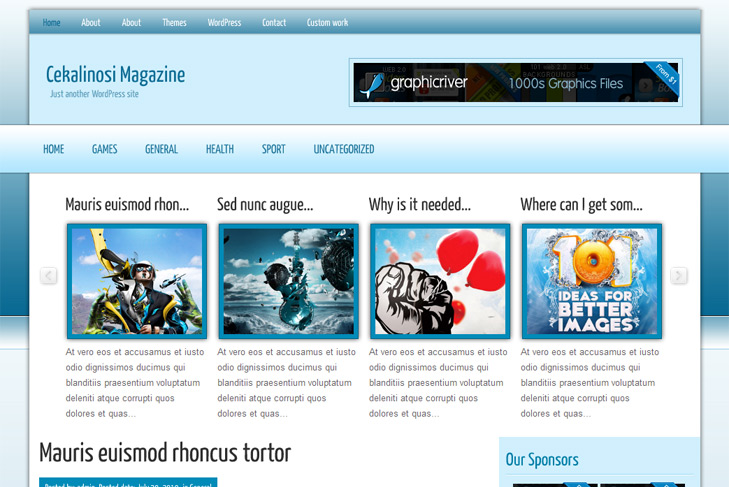
Theme Features:
- News slider built in
- 468 x 165 banner slot
- 4 125 x 125 custom banner slots
- Banner positions can be turned off
- Cross browser compatibility IE7, IE8, Firefox, Safari, Chrome, Opera
- Admin Page Options
- WordPress 3.0 menu system supported + backwarkd compatability
- 2 Columns
- Right Sidebar
- Pages menu
- Exclude pages menu option
- Category menu
- Exclude category menu option
- Threaded comments, Trackbacks & Pingbacks are separated
- Gravatar ready
- RSS ready, Twitter ready, Subscription ready
- Post thumbnails (automatic image resizing)
- Page navigation included, no plugin required
- Google Analytics code script can be inserted
- Widget ready
- |Cufon fonts
- Flickr ready
- Readme included
- PSD Logo included
- WP 3.0 ready


Elegant Themes
ThemesForest
StudioPress
Thesis Theme
Mojo Themes


Great theme but I’m having trouble with the News slider. I added 7 thumbnails. I get them 3 thumbs long but then I get three rows on top of one another instead of all the images horizontally. The advance buttons to the left and right of the thumbs don’t move the slider at all. Plus there are regular window scroll bars to move the thumbs up and down. Kind of defeats the purpose of the slider buttons.
I’m still working on rectifying the issue. I’ll post a solution if I figure it out in case others have the same trouble.
Can you post your url? Maybe you’re having some prototype plugin which confilcts slider. Try without plugins, or contact me on email, send me user and pass, to see myself. Tnx!
Thanks for the quick reply. Sent you an email with details. Out of curiosity I tried installing another theme with the same slider on another of my websites. Same issue. Slider moved up and down via scroll bars and not side to side using the small right and left buttons.
I’ve sent you answer. You were putting wrong image links, like /images/slide1.jpg. You should put full url.
Hello. First i what to tell what a great job u do whit this perfect theme. 10Q! I love it.
Second i have a tehnical problem: the sidebar and the footer disappear from the front of the site. Into the post everything is’t ok. Please tell me what i must do. Thanks.
i reinstal the theme and i deactivate a bug plugin \WP-PageNavi\. In this moment the site is fantastic thanks to you.
Im glad you solved the problem
Everybody should now that all of our themes are coming with page navigation built in, so you shouldn’t install wp pagenavi plugin. I’ll add that to readme
Hello, thanks for the great theme! All of your work is excellent, thank you again.
I can’t get the gallery to work? Here’s what I’ve done so far:
1) In the SWT Theme options: MyGallery Options, I selected “display” and selected the category and the number of slides.
2) I created posts in that category and on the bottom of the new post’s page I did the “Add Custom Field” and typed thumbnail for the name and put the url of my image in the value.
?????… There is still no gallery showing? did I do something wrong? Thank you again for your great theme and your help. Cheers, Charles
Hi Charles, there was a bug in a theme. Theme has been updated yesterday, you can download it and install it again, but faster solution is just to open header.php and replace swt_gallery2 with swt_gallery. Try and let me know.
Regards,
Sinisa
thank’s for such a eye-catching themes, but how to see this themes on live demo( the live demo goes somewhere else)
Thank’s
Hi,
Im not sure what do you mean (I assume that you saw some kind of error)?