






Demo Best hosting Download (3753)
Theme Features:
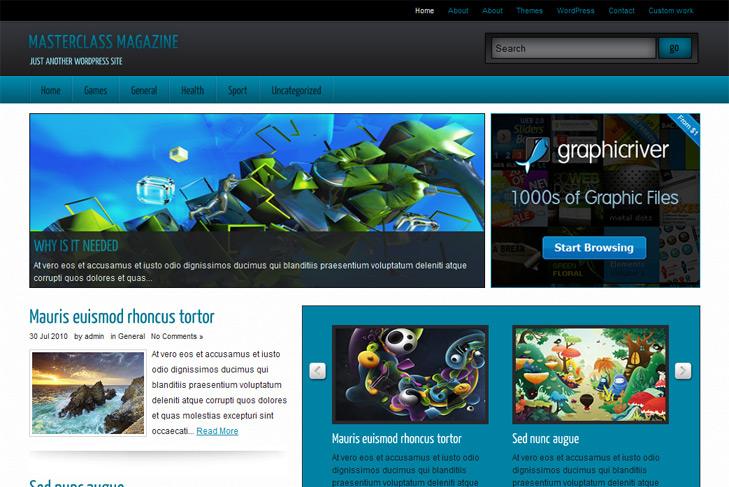
- Content slider built in
- Mygallery built in
- Most popular articles
- 300 x 250 banner slot
- 4 125 x 125 custom banner slots
- Banner positions can be turned off
- Cross browser compatibility IE7, IE8, Firefox, Safari, Chrome, Opera
- Enchased admin panel
- WordPress 3.0 menu system supported + backwarkd compatability
- 3 Columns
- 3 Sidebars
- Pages menu
- Exclude pages menu option
- Threaded comments, Trackbacks & Pingbacks are separated
- Gravatar ready
- RSS ready, Twitter ready, Subscription ready
- Post thumbnails (automatic image resizing)
- Latest articles on category (can be turned off)
- Page navigation included, no plugin required
- Google Analytics code script can be inserted
- Widget ready
- WP 3.0 ready
- Readme included
- PSD Logo included


Hi Sin (I mistakenly posted this message on the Silver Mag part, but I’m usin Master Class Magazine as my theme. Sorry about that),
Thanks for your amazing Theme, I guess I tried a hundred before settling on yours.
First, I’m french, so excuse me in advance if there’s any mistake.
My problem is with the slider.
I’ve followed every step of the readme and watched the “howtoslide” file, there’s no way my slider would show up. I also read the conversation you had with Michelle, it didn’t help me.
To be more specific :
- I’ve selected the images I wanted to appear on the slider. I’ve uploaded them on FileZilla
http://www.thefatman.fr/images/wavves.jpg
http://www.thefatman.fr/images/best-coast.jpg
- I enabled the slider and selected the MP3 category. Number of slides : 5.
- If you look at the last 3 articles on my website, they’re all in the “MP3″ category, and I added a custom field value “slide” with a link to the image. They won’t appear on the slider.
Have you got any idea what it might be ?
I have another question : I can of course set my categories on capital letters, but I can’t do it for home. Is there any way I can do it ?
Thanks !
Anthony
Hi Anthony, the best way would be to make me account on your site and send me login details to check myself. You can send on email, via contact form.
Its hard to say this way, cause you’re saying you did it all good, but I have to see myself.
For uppercase letters on categories, you can write
under #nav2 li a in style.css
First off, thanks Sin for these simple and well designed wordpress themes. Masterclass Magazine is my favorite. Second, I seem to be having a problem with getting the jquery sliders and other custom elements to work with categories I create. For example, I created a category immediately after installing wordpress called ‘Top Stories’ and saved one of my posts to that category. When I set the slider category to ‘Uncategorized’ (which shows up twice in the category drop-down menu for some reason) it works just fine but when I changed the slider category to ‘Top Stories’ it no longer works. I repeated this test with the bottom slider settings, latest posts from categories, etc. and the same thing happens with each. When setting each theme option’s category to ‘Uncategorized’ they work and changing them to another category causes them to fail. I also downloaded the Yellow Mag theme and seem to have the exact same problem. Am I doing something wrong? Any ideas? Thanks in advance.
Hi Nate, you must be doing something wrong.
Do you have that double category bug in default theme in dropdown? Anyway, you can just create custom menu and publish it, that category will not show then I guess.
Try to add more posts to Top Stories, s3slider needs at least 2 to work. Btw, if you’re making this on your localhost, you may have some error with your server. I have that sometimes, all my categories are duplicated, and cant save anything into them.
Hi, I love this theme and I use for my webpage “www.diariomacquero.com”. I have a question for you. I would like to see the slide in all pages and single article. I copy this text:
and I put it betwen “get_header()” and “id=”contentwrap”" in page.php and single.php. But I can see (in pages and single articles) the slide but not the articles that are linked. How could I do that?
Sorry about my english. I´m from Spain and my english is not good.
Greetings and thanks!
Hi,
open index.php find call to slider (from line 3 to 6) and paste it after get_header in single.php. After that, open header.php and remove lines 32 and 34 (php if).
Thats it.
Hello, I like this theme very much, but the main menu does not use submenus… I used the usual Menu system to set it up, but the submenu doeas not appear, all the items are displayd together, one after the other.
Can you give a suggestion how to make it work?
thanks
I found a solution, i copied the files of superfish of another theme in this one and now it’s working… by now it’s working.
Glad to hear that, at least someone knew how to do that
Hello, i hope to help you if i tell you that there is a little mistake in single.php and page.php (maybe intentional).
There is a line for comments that is: , but in this way never use your comments.php file.
I suppose it should be:
May i ask you a favour? The text color in this website is too light, and i have difficulties to read it. Can you mak it a bit darker, please?
OPS, it did not included the code.
The old was
<?php comments_template(true, ”); ?>
and this is the new
<?php comments_template(”,true); ?>
Hi, yes you’re right. This way are only used comments from wordpress comments template, there are tutorials how to change that. For the text color, you can set your own color in style.css under .entry, type there color: #000; for example. Or change it in html body in css.
Sorry, when i said this website, i meant http://www.simplewpthemes.com; i cannot change it…
I know, I already ass kicked my designer
, we’ll do redesign as soon as we clear things, for now it’s this way… Use ctrl + to zoom if you cant see, I do that sometimes.
Hi love this theme, thank you for that! I’m trying to use it on my site, everything seems to be ok, but there’s one problem: I can’t seem to get the images of the featured posts work on the slider. What information do you need me to give you to able to help me?
http://ultimatea1.org/home
Thank you
Ana
This theme is using custom fields for the slider, not featured images. Check the faq and readme for instructions.
Hi. Thanks for looking into it. I used the custom fields for the images and I upload the images to the server, but still the images aren’t showing up.
Then check category name, and swt theme options, is category selected.