






Magazine Wordpress themes /

Collection of free magazine wordpress themes

|  

Genesis Framework for WordPress
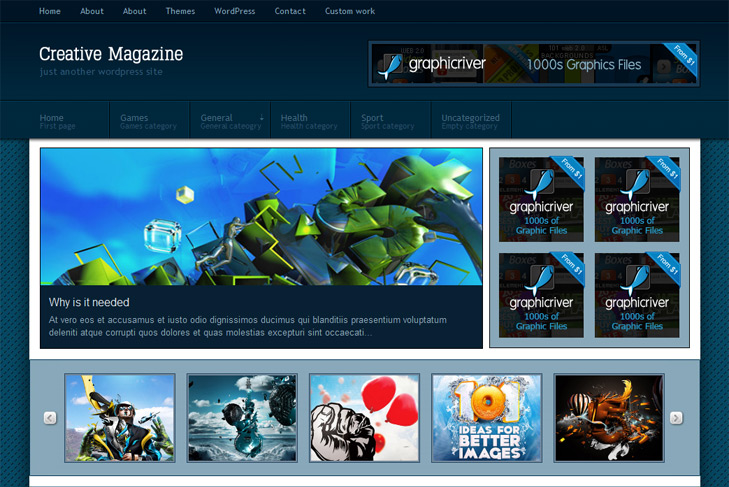
Creative Magazine

Creative Magazine free Cool, Magazine Wordpress Theme

Best web hosting

Demo Download (1656)

Theme Features:

  1. Content slider built in
  2. 468 x 165 banner slot
  3. 4 125 x 125 custom banner slots
  4. Banner positions can be turned off
  5. Cross browser compatibility IE7, IE8, Firefox, Safari, Chrome, Opera
  6. Admin Page Options
  7. WordPress 3.0 menu system supported + backwarkd compatability
  8. 2 Columns
  9. 2 Sidebars
  10. Pages dropdown menu
  11. Exclude pages menu option
  12. Category dropdown menu with description under
  13. Exclude category menu option
  14. Threaded comments, Trackbacks & Pingbacks are separated
  15. Gravatar ready
  16. RSS ready, Twitter ready, Subscription ready
  17. Post thumbnails (automatic image resizing)
  18. Page navigation included, no plugin required
  19. Google Analytics code script can be inserted
  20. Widget ready
  21. PSD Logo included
  22. Readme included
  23. Easy to customize
  24. WP 3.0 ready

10 Responses to Creative Magazine

  1. Having problems with the drop down menus in the nav 2 bar. The main categories are showing up but the categories under the parent categories are not. I have used this theme on another site and it worked, can’t figure out why it wont work on mine
    thanks
    Kim

  2. sin2384 on:

    Hi Kim,
    did you made custom menu as you should and all sub cats arranged beneath parent? Can you provide your url?

  3. it seems to be ok now… Once I activated the gallery and slider it started working correctly! thanks!

  4. me again…. Is there anyway to change the slider so you don’t have to just pick one category? I’d like it to include several if not all.

    also the photos are not resizing very neatly for the slider or the gallery, what are the sizes of the images so I can resize them my self?

    Thanks! Loving it so far.

  5. found the size of the slider, but still really distorting photos, can you help, can I change it so it doesn’t resize?

  6. sin2384 on:

    Hi Kim,
    at the moment, for the slider – no. I’ll try that on my future themes.
    For image size, try using 632×286. You can put little bigger than this.

    Btw, just remebered – for slider – create additional category, for example featured category.
    All posts that you want in the slider, just add to this category too. And select that featured category for sliding category in theme options. This should do it.

  7. great idea for the featured category! I’m gonna do that.

    Still having image problems cause it stretches them out, I think it would be better if it didn’t autosize and you just set the size yourself, if the pic is too small for the window, then there would be a background behind it. rather than the stretching.

  8. sin2384 on:

    How can be still stretched? If you make them 632×286 in photoshop for example, and put it in the custom field that way, how is still stretched? Or we dont understand each other somewhere..

  9. dedi on:

    i have problem with safari… safari not suport with this thema

  10. sin2384 on:

    Hi Dedi,
    what kind a problem? I’ve tested theme on windows, safari is working. What version do you have, and is it maybe on mac?

Leave a Reply

Your email address will not be published. Required fields are marked *

*

You may use these HTML tags and attributes: <a href="" title=""> <abbr title=""> <acronym title=""> <b> <blockquote cite=""> <cite> <code> <del datetime=""> <em> <i> <q cite=""> <strike> <strong>

 
Wordpress Hosting

About Us

Simple wp themes is a collection of all wordpress themes made by authors of this site. All themes are free to use.

Latest Tweets

  • Loading Tweets..
Follow us on Twitter

Popular Files

  • U-Design WordPress Theme
  • Modernize - Flexibility of Wordpress
  • Angular - Responsive Portfolio
  • Karma - Clean and Modern Wordpress Theme
  • Scope: Agency / Business WordPress Theme
  • Striking Premium Corporate & Portfolio WP Theme

.