






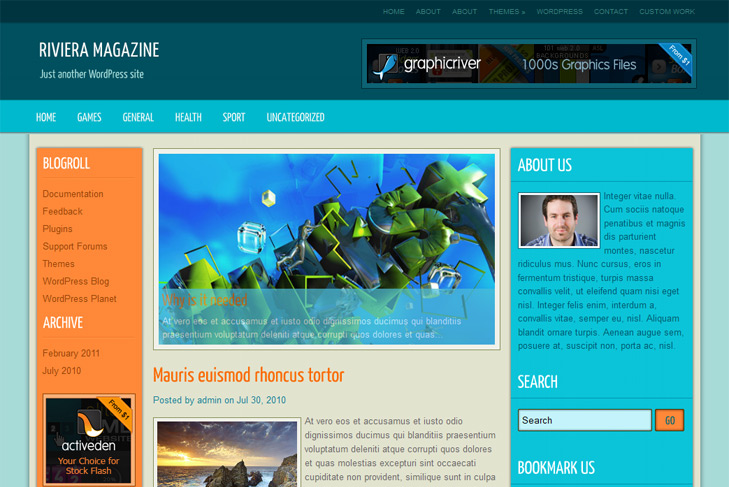
Theme Features:
- Content slider built in
- 468 x 165 banner slot & 120×600 banner slot
- 4 125 x 125 custom banner slots
- Banner positions can be turned off
- Cross browser compatibility IE7, IE8, Firefox, Safari, Chrome, Opera
- Admin Page Options
- WordPress 3.0 menu system supported + backwarkd compatability
- 3 Columns
- 2 Sidebars
- Pages dropdown menu
- Exclude pages menu option
- Category dropdown menu
- Exclude category menu option
- Threaded comments, Trackbacks & Pingbacks are separated
- Gravatar ready
- RSS ready, Twitter ready, Subscription ready
- Post thumbnails (automatic image resizing)
- Page navigation included, no plugin required
- Google Analytics code script can be inserted
- Widget ready
- Clean coded
- Readme included
- PSD Logo included
- Easy to customize
- WP 3.0 ready


Elegant Themes
ThemesForest
StudioPress
Thesis Theme
Mojo Themes


Hi,
I’ve downloaded your template but I’ve some problem. I’ve add a new largest header.png and I’ve modified css style to adjust the theme. But now the category menu show only the “Uncategorized” category and no more. How can risolve this problem? Thanks so much for your help.
Hi, sorry cause of late respond, Im not getting emails about comments, cause of so much spam here. Well, first, maybe you have only one category, I dont know that. Second, maybe you’ve created custom menu and added only that one link to it. If you reverse changes with header, what happens?
No problem
. So I’ve more than one categories but it doesn’t show nothing only the uncategorized category that have one post and I don’t add custom menu. If I add post for each category it appear in menu but in firefox not shows the subcategories, in internet explorer it show also subcategories. How can risolve this problem? The situation is the same even if I don’t change the header.
You will not have categories displayed in the menu, until you have posts in that categories. This is the classic case, just add posts in every category, they will show up.
You’re not doing something right, this must work, try from beginning.
Make category, add post in it. Assign this category subcategory, add post in the subcategory and see if it works.
Sorry another question it’s possible to exhange the sidebar. So the left sidebar to the right and the right to the left. How can I do it? Thanks so much
For this, you should replace calls in index.php, category.php, archive.php, single.php, page.php.
Just replace include(‘sidebar-left.php’) with get_sidebar, and vice versa. And then you’ll have to set margins to adjust alignment.
Thanks for all. Another question in right sidebar it’s possibile to show category hierarchy as on categories menu? Thansk so much
You mean, to have them indented, like:
first cat
first subcategory
2nd category?
No
I dont style themes like that, my designer thinks its ugly, and if he thinks its ugly, we aint gonna do that way!
how to remove the title of landscaping?
What do you mean by landscaping?
Delete the title fonts landscaping .My blog use Chinese. Title chinese fonts is not landscaping So……
Im still not sure that I understand, but if you want to remove cufon from fonts,
in header.php you should remove everything from 48 to 66 line. Also line 31, and 32.
If you just want to remove it from post titles, delete in all cufon.replace() calls h2. That will do it.
Thanks ! i Delete the 31, and 32.
is OK!