






Nature Wordpress themes /

Collection of free nature wordpress themes

|  

Genesis Framework for WordPress
Zombie Mag

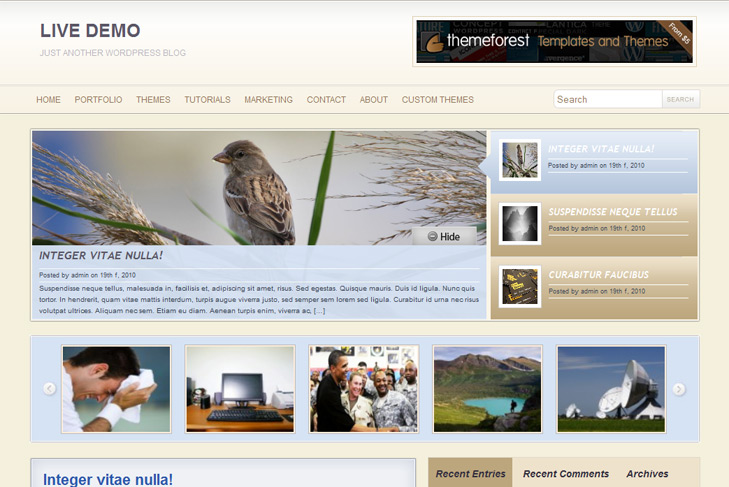
Zombie Mag free Magazine, Nature Wordpress Theme

Best web hosting

Demo Download (2642)

Theme Features:

  1. Content slider built in
  2. Mygallery plugin built in
  3. 468 x 165 banner slot
  4. 3 125 x 125 custom banner slots
  5. Banner positions can be turned off
  6. Cross browser compatibility IE7, IE8, Firefox, Safari, Chrome, Opera
  7. Admin Page Options
  8. Jquery tabber
  9. 3 Columns
  10. 2 Sidebars
  11. Pages menu
  12. Exclude pages menu option
  13. Threaded comments, Trackbacks & Pingbacks are separated
  14. Gravatar ready
  15. RSS ready, Subscription ready
  16. Post thumbnails (automatic image resizing)
  17. Valid CSS and XHTML
  18. Page navigation included, no plugin required
  19. Google Analytics code script can be inserted
  20. Widget ready
  21. Clean coded
  22. Easy to customize
  23. WP 3.0 ready

16 Responses to Zombie Mag

  1. Flor on:

    I wanted to take out the of the footer and now my whole wordpress instalation is broken! I cannot even change the theme.

    What to do now? I have no access to the FTP.

  2. Flor on:

    Sorry, it “ate” the part of the code I wrote. I wanted to take out only the code part that ads the analytics from the panel, because I wanted to add it myself, as my friend, who uses the site with me, like to touch around the theme and changes many things she shouldnt”. ;o)

  3. sin2384 on:

    Hi Flor, its not allowed to remove links from the footer. Did you tried to delete theme?
    About analytics, its enough to remove this from footer.php:

    < ?php
    $code = get_option('swt_custom_analytics_code'); echo stripslashes($code);
    ?>

    And insert your script code right there, theme option for analytics wont work.

  4. Flor on:

    Hello! This is what I did, but killed my whole instalation of the wordpress… I have no way to change the theme, or even delete, because I got the message “This theme is sponsored, all links in the footer should remain intact”. I even tried to “come back” to keep the footer the same, but nothing worked.
    I have no access to ftp, that´s why I couldnt delete the theme yet… must wait my brother do it, as it seems I cannot do anything inside the wordpress right now.
    Great theme, tho! I will keep using it, and be sure I will not touch the footer again.

  5. sin2384 on:

    If wordpress is not working, how you tried to get back links in the footer? Or just download the theme again, copy and paste whole footer to footer.php if you can use wp-admin, with editor.

  6. Flor on:

    It was like “cache”. I can always come back, but nothing works after reloading or sending again the files.
    Right now if I try to “resend” the footer in this way, I get the same error message.

  7. Flor on:

    It is ok, my brother deleted and now I can start over! Thanks for your time, you were very quick answering me, it was very nice of you.

    Thanks!!

  8. Sin2384 on:

    Always! Wish you best luck with you site!

  9. Hi, Problems with slide images. Probable in $screen…

    Help me, please

    images broken…
    this is problem is in functions.php?

  10. sin2384 on:

    Hi Bruno,
    looks like you’ve done something wrong. I’ve just checked theme again, its ok, no problems with $screen or anything.

    Please follow next steps to figure out whats wrong:

    1. First, you should select sliding category via theme options and number of slides.

    2. To have an images in the slider, you just need to add a custom field, type slide and leave link to the image. Or check howtoslide.png in zombiemag/images/.

    If this doesnt work, delete theme from server, download it again and reinstall.

  11. How do you see the image on the carousel?

    http://raytur.com.br/

    Thanks…

  12. sin2384 on:

    Images in slider are good now, and for the mygallery is the same procedure. Just instead of slide type thumbnail.

  13. Thanks

    It´s site is ok…

    Congratulations… This website is very good…

  14. Christina on:

    I’m having a lot of problems with this theme (In WP3.0.1)

    Call to undefined function add_theme_support() in /wp-content/themes/zombiemag/includes/images.php on line 22
    This made the whole site “unwathable”. Removed the code in images.php just so I could get access to Admin panel.

    Fatal error: Call to undefined function get_metadata() in wp-content/themes/zombiemag/includes/images.php on line 119
    I can’t show the theme correctly. I have no sidepanel and it “cuts” off after half of the first post.

    Solution anyone?

  15. sin2384 on:

    Hi Christina, sorry cause of late response, all comments ended up in spam.
    I guess its to late now, but anyway, this error is very strange, have you tried to download theme and install it again?

  16. WGW on:

    Hi!
    Can you help me to appear in the carousel?
    tnx

Leave a Reply

Your email address will not be published. Required fields are marked *

*

You may use these HTML tags and attributes: <a href="" title=""> <abbr title=""> <acronym title=""> <b> <blockquote cite=""> <cite> <code> <del datetime=""> <em> <i> <q cite=""> <strike> <strong>

 
Wordpress Hosting

About Us

Simple wp themes is a collection of all wordpress themes made by authors of this site. All themes are free to use.

Latest Tweets

  • Loading Tweets..
Follow us on Twitter

Popular Files

  • U-Design WordPress Theme
  • Modernize - Flexibility of Wordpress
  • Angular - Responsive Portfolio
  • Karma - Clean and Modern Wordpress Theme
  • Striking Premium Corporate & Portfolio WP Theme
  • Di'verso - A Flexible WordPress Theme

.