






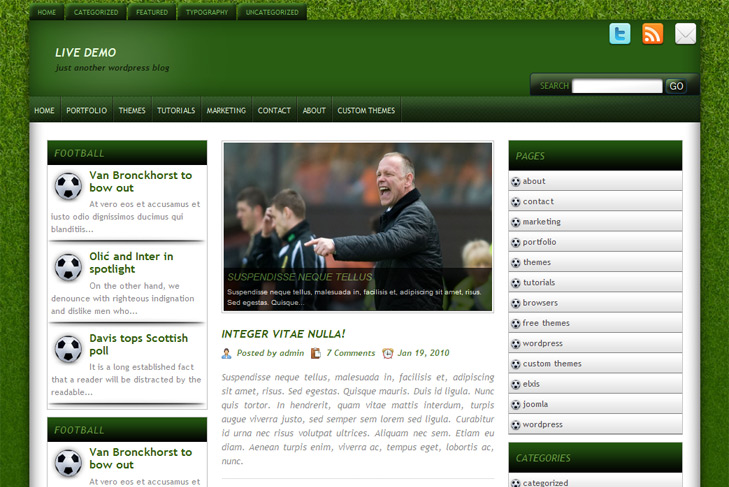
Theme Features:
- Content slider built in
- Cross browser compatibility IE7, IE8, Firefox, Safari, Chrome, Opera
- Admin Page Options
- 3 Columns & Collapsibile content column
- Right Sidebar
- Pages dropdown menu
- Exclude pages menu option
- Category menu
- Exclude category menu option
- Threaded comments, Trackbacks & Pingbacks are separated
- Gravatar ready
- RSS ready, Twitter ready, Subscription ready
- Post thumbnails (automatic image resizing)
- Valid CSS and XHTML
- Latest articles on category (can be turned off)
- Page navigation included, no plugin required
- Google Analytics code script can be inserted
- Widget ready
- Clean coded
- Easy to customize
- WP 2.9.2 ready


Elegant Themes
ThemesForest
StudioPress
Thesis Theme
Mojo Themes


Hi, why does the post thumbnails in feature categories show in Firefox, but not in Internet Explorer?
Thanks for pointing out, it was problem with image width, its set to 100%.
You may download theme again, its been updated, or even better, open up style.css and find:
.entry img, .post_thumbnail and delete max-width: 100%;
It will work.
Hi. I’m using Soccer Tribune theme for my website and I’d love to be able to change the colour of the header from green to Royal blue. Can you tell me how to do this please?
Also I’d like to include our club logo on the header. Can this be done also please?
Regards
Pete
Hi Fatwallet,
you’ll have to edit header.jpg in photoshop, and for logo, open header.php and for logo Im sending you which code to replace on email.
I’ve got a header, that’s plain blue, that I want to replace the green one with, but I don’t know how! The header is on my pc, but where do I save it to?
Name it header.jpg and replace with the one in the soccertribune/images folder.
Sorry, but I know what I need to do, I just don’t know how to access the soccertribune/images folder! Where is that?
Via ftp!
It should be something like this – wp-content/themes/soccertribune/images/.
Teah, I tried going to http://www.clifferoyalsfc.globeeffects.co.uk/wp-content/themes/soccertribune/images/ which is where the header.jpg file is, but I just get the following …..
The website cannot display the page
HTTP 500
Most likely causes:
The website is under maintenance.
The website has a programming error.
What you can try:
Refresh the page.
Go back to the previous page.
More information
This error (HTTP 500 Internal Server Error) means that the website you are visiting had a server problem which prevented the webpage from displaying.
For more information about HTTP errors, see Help.
Hi,
I am using your theme. This is my site http://allaboutepl.com/. Right now I can see both the sliding images and also the featured categories on the left menu. I want to keep the sliding panel and remove the featured categories on the left menu, Can you please let me know how to do that.
Hi Rajan,
maybe the best and fastest solution would be to disable featured categories and the slider, and then install this plugin – http://wordpress.org/extend/plugins/s3slider-plugin/, same plugin is built into theme. Try like that, if not, we’ll try the harder way.
hi Sin2384,
Thanks for your suggestion. But that plugin did not work out. It was about adding images and sliding while your theme option is good as we can also assign blog posts in the slider with images. please let me know the other way, if that is doable
with regards
Rajanmr