






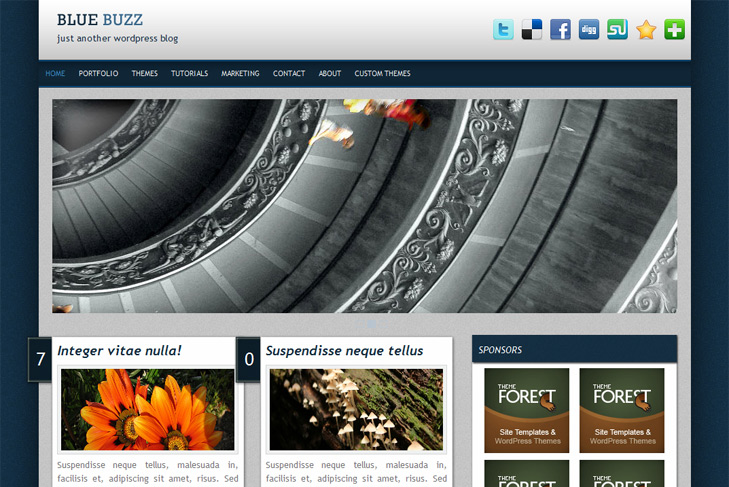
Theme Features:
- Coin slider built in
- 4 125 x 125 custom banner slots
- Banner positions can be turned off
- Cross browser compatibility IE7, IE8, Firefox, Safari, Chrome, Opera
- Admin Page Options
- Social Bookmark Ready (can be turned off)
- 2 Columns
- 2 Sidebars
- Pages menu
- Exclude pages menu option
- Threaded comments, Trackbacks & Pingbacks are separated
- Gravatar ready
- Post thumbnails (automatic image resizing)
- Valid CSS and XHTML
- Page navigation included, no plugin required
- Google Analytics code script can be inserted
- Widget ready
- Clean coded
- Easy to customize
- WP 2.9.2 ready


Elegant Themes
ThemesForest
StudioPress
Thesis Theme
Mojo Themes


hi, I’ve try to install this theme to my blog but found something wrong with it. When I preview it. Here’s no content found in my home page. I don’t know if it because my blog is posted in Chinese. However, when I click the blank home page, I went into some posts. I ca also found the pages link above, when I click them I can get in the page. But all the pages and post have a same problem show under the Posted by Mo | Edit |
Fatal error: Only variables can be passed by reference in /home/content/m/o/h/mohoko/html/wordpress286/wp-content/themes/bluebuzz/functions.php on line 49. I can give you some screen shoot if you want.
However, this theme is great. I like it so much. Thanks for sharing.
Hi Mo,
glad you like theme. I would like to help, but Im not sure whats happening, but I’ll try.
Find this function in functions.php and remove it:
function truncate_post($amount,$quote_after=false) {
$truncate = get_the_content();
$truncate = apply_filters(‘the_content’, $truncate);
$truncate = preg_replace(‘@@si’, ”, $truncate);
$truncate = preg_replace(‘@
@si’, ”, $truncate);
$truncate = strip_tags($truncate);
$truncate = substr($truncate, 0, strrpos(substr($truncate, 0, $amount), ‘ ‘));
echo $truncate;
echo “…”;
if ($quote_after) echo(”);
}
Then in index.php replace:
< ?php truncate_post(410,true); ?>
with:
< ?php the_content(''); ?>.
Do the same for category.php and archive.php file.
If this is not working, send me screenshot on email (sin2384 at gmail dot com).
Hi Sin22384
This works! Thank you so much.
Will this theme upgrate to support wordpress3.0?
Hi Mo again,
it works with wp 3.0. Just tested it.
Anyway if you find any problem, let me know!
Just downloaded this theme and was wondering why dropdown menus do not work at all. The nested categories just show up in next to and below the header but not as dropdown items.
Hi Rob,
this theme does not suport dropdown.
i downloaded this theme and its really nice. but i don’t know how to make that slide show. can anyone help me plz
There’s explanation in readme file!
To have an images in the slider, you just add a custom field, type slide and leave link to the image. Or check howtoslide.png in themefolder/images/, visual is better
Images for this slider should be 920×315 px.
But, first of first, you should select sliding category via theme options and number of slides.
I have read the instructions both the read me and the image provided (howtoslide) but there is no slide in my site. i think i do everything right.
I just wonder why it doesn’t work.
Hi Ekrem,
can you please make me account on your site, I’ll login to see myself.
You can send me login info via contact form. Thanks!
hi,
i had download this theme and upload it.
i also can’t make the slide show, can you tell me where the custom field?
and tell my how to close the slide?
thank you
You have to go in screen options – top right corner and enable custom fields to show under posts. Check the readme please for further instructions.