






Game Wordpress themes /

Collection of free gaming wordpress themes

|  

Genesis Framework for WordPress
Blue Mag

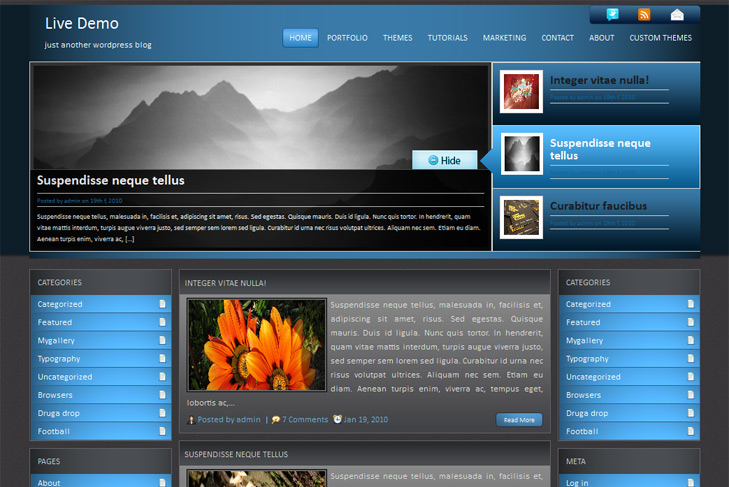
Blue Mag free Blog, Cool, Game Wordpress Theme

Best web hosting

Demo Download (1574)

Theme Features:

  1. Content slider built in
  2. Cross browser compatibility IE7, IE8, Firefox, Safari, Chrome, Opera
  3. Admin Page Options
  4. 3 Columns
  5. 2 Sidebars
  6. Pages menu
  7. Exclude pages menu option
  8. Category menu
  9. Exclude category menu option
  10. Threaded comments, Trackbacks & Pingbacks are separated
  11. Gravatar ready
  12. RSS ready, Twitter ready, Subscription ready
  13. Post thumbnails (automatic image resizing)
  14. Valid CSS and XHTML
  15. Page navigation included, no plugin required
  16. Google Analytics code script can be inserted
  17. Widget ready
  18. Clean coded
  19. Easy to customize
  20. WP 2.9.2 ready

14 Responses to Blue Mag

  1. Leire on:

    Hi,
    I am using WP 2.8.6, and have problems to load this theme. I am getting instantly error:
    Fatal error: Call to undefined function add_theme_support() in /home/www/oriflame-blog.cz/subdomeny/www/wp-content/themes/bluemag/includes/images.php on line 22

    I am not php programmer, and dont know what is wrong in the file images.php, can u pls look on it? Theme is not possible even activate.

    Thanks a lot, would be shame not to even see it or decide how to use it.

  2. sin2384 on:

    Hi Leire,
    problem is the version of wordpress. Theme is set to automatically obtains images to keep the look as is, and it adds support for “post thumbnails” to wordpress. Unfortunately, post thumbnails are working from version 2.9. If you cant upgrade to last version cause of old plugins, let me know here. I’ll try to manage something.

    Its same for Sky Mag theme, and few last themes are working the same way. Let me know.

  3. msabir on:

    hi,
    I’m using your theme with WP 3.0, and I had a problem with the audio player plugin does not work with this theme. Is there a way to solve this problem?

    Thanks

  4. sin2384 on:

    Hi Msabir,
    I’ve updated theme, please download it again and try, see if it works. If not, leave me link to the plugin, to test myself.

    Regards

  5. msabir on:

    Hi Sin2384
    Thanks for your reply, I downloaded the theme and I loaded back on my site but still does not work.

    This is the link of the plugin: http://wordpress.org/extend/plugins/audio-player/

    Thanks

  6. sin2384 on:

    Hi again Msabir,
    theme is compatibile! It works on single page, BUT – not on index or category page, cause posts are automatically truncated. To make audio player work on those pages, you need to open up index.php and category.php (and maybe if you want on archive.php) and find this:

    < ?php truncate_post(400,true) ;?>

    and replace with:

    < ?php the_content(''); ?>.

    Posts word limit will be lost, but you can fix that manually, or try to install wordpress content limit plugin.

  7. msabir on:

    Hi Sin2384

    I tried again, but neither works nor in the single post, this problem only happens with your themes. The plugin works with other themes in my site but your not, I do not know previously.
    these are the themes with which I tried and wrong:
    - SkyMag
    - BlueMag
    - CreamZine
    - GamerMagazine

    As I said in my first comment I am using wp 3.0

    Thanks.

  8. sin2384 on:

    Hi Msabir again,
    I’ve updated theme, but replaced with wrong one. Now, everything should be working, even with themes that you said. Please download them again. But same rule worths for maybe every of them:
    if in index.php its written < ?php truncate_posts(); ?> inestead of < ?php the_content(''); ?>, you wont be able to see player on frontpage, category page, archieve. Just replace what I’ve told you, and you should be fine.

    Let me know if you now have any troubles.

  9. msabir on:

    Thanks a lot,
    I just tried on a blog and works well.
    Since I’m using on a site that I would not put offline now to load the theme, could you tell me which file you modifier. So just load the edited.

    Thanks again

  10. sin2384 on:

    You just need to add < ?php wp_footer(); ?> in footer.php file right before .

  11. msabir on:

    Hi Sin2384

    Thanks a lot for your availability
    I apologize for the inconvenience.

    thanks

  12. msabir on:

    Hi Sin2384

    it’s me again, I noticed something in the theme when I click on a tag opens a page with posts marked with this tag, but you can not open any article, because the title is not clickable.
    if you go on this link: http://www.simplewpthemes.com/demo/preview/?tag=mauris
    If you try to open an article, those listed will not open

  13. sin2384 on:

    Hi Msabir,
    I was in dilemma cause of duplicate content. Thats why I made it that way.
    I’ll send you on email how to add read button if you need it.

  14. msabir on:

    Hi Sin3248

    I received the email, thanks a lot, I apologize for the inconvenience.

    Thanks for Everything.

Leave a Reply

Your email address will not be published. Required fields are marked *

*

You may use these HTML tags and attributes: <a href="" title=""> <abbr title=""> <acronym title=""> <b> <blockquote cite=""> <cite> <code> <del datetime=""> <em> <i> <q cite=""> <strike> <strong>

 
Wordpress Hosting

About Us

Simple wp themes is a collection of all wordpress themes made by authors of this site. All themes are free to use.

Latest Tweets

  • Loading Tweets..
Follow us on Twitter

Popular Files

  • U-Design WordPress Theme
  • Modernize - Flexibility of Wordpress
  • Angular - Responsive Portfolio
  • Karma - Clean and Modern Wordpress Theme
  • Scope: Agency / Business WordPress Theme
  • Striking Premium Corporate & Portfolio WP Theme

.