






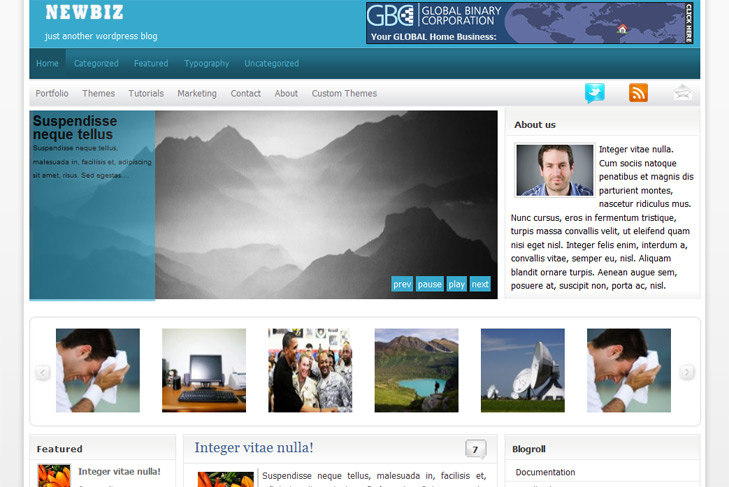
New Biz

March 9th, 2010

LIVE DEMO | New Biz (707)

  • Content slider built in (can be turned off)
  • Mygallery built in (can be turned off)
  • 468 x 165 banner slot
  • Banner positions can be turned off
  • Cross browser compatibility IE7, IE8, Firefox, Safari, Chrome, Opera
  • Admin Page Options
  • 3 Columns – collapsibile content column
  • Right Sidebar
  • Pages menu
  • Exclude pages menu option
  • Category menu
  • Exclude category menu option
  • Threaded comments, Trackbacks & Pingbacks are separated
  • Gravatar ready
  • RSS, Twitter, Subscription ready
  • About us section (can be turned off)
  • Valid CSS and XHTML
  • Latest articles on category (can be turned off)
  • Page navigation included, no plugin required
  • Google Analytics code script can be inserted
  • Widget ready
  • Clean coded
  • Easy to customize
  • WP 2.9.2 ready
  • 2 Responses to "New Biz"

    1. agung h says:

      how to display the picture in featured slider..??it nedd add custem field url of picture or what..?thanks before,…

    2. sin2384 says:

      Hi Agung,
      yes, you suppose to enter image url under value on the right side, and under left – type slide.
      Everything is in the readme, you should first select sliding category via theme options and number of slides. Then post which is under that category, add custom field, and thats it.

      Regards

    Leave a Reply