






March 2nd, 2010

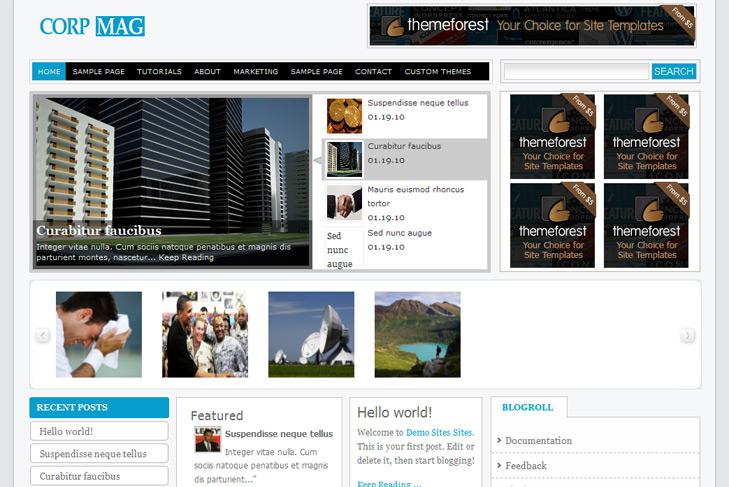
LIVE DEMO | Corp Mag (1222)
Autoscrolling content slider built in
Mygallery built in
468 x 165 banner slot
4 125 x 125 custom banner slots
Banner positions can be turned off
Cross browser compatibility IE7, IE8, Firefox, Safari, Chrome, Opera
Admin Page Options
4 Columns
Collapsibile content column
2 Sidebars
Pages dropdown menu
Exclude pages menu option
Threaded comments, Trackbacks & Pingbacks are separated
Gravatar ready
Valid CSS and XHTML
Latest articles on category (can be turned off)
Page navigation included, no plugin required
Google Analytics code script can be inserted
Widget ready
Clean coded
Easy to customize
WP 2.9.2 ready
Tags: 2 sidebars, 4 columns, analytics ready, autoscrolling content slider, banners ready, collapsibile column, dropdown, gravatar ready, latest articles, mygallery, navigation ready, theme options, threaded comments
Posted in Free WP Themes | Posted by sin2384 | 33 Comments »
I have a problem with this theme. I downloaded it and I got following message when entering my site:
Parse error: syntax error, unexpected ‘{‘ in /home/content/88/4802988/html/wp-content/themes/corpmag/functions.php on line 17
Could someone please help me?
Thats very strange, cause I just downloaded theme to check is everything allright, and everything is ok! Try downloading again and replace all the files.
How do I post images to the featured posts and gallery?
Thanks
Everything is in the readme file!
“To have an images in the slider, you just add a custom field, type slide and leave link to the image.
If you want to have small thumbnails in mygallery plugin, you have to type thumbnail in custom field and leave link to the image.
But, first of first, you should select sliding category via theme options and number of slides. “
And how do we get images in the columns/sidebars below mygallery?
For that, just add regular image in featured post and thats it. It will be automatically pulled from post.
If you have any problems, feel free to ask.
Hi Sin2384
I’m still having problems with images for the Slide and Gallery.
I have made custom field “slide” and “thumbnail” and have uploaded the images under Media Gallery. Nonetheless, the images does not show up on slider and gallery!
Do I have to give absolute path to the image URL (although I config the theme to look at wp-content/uploads as default folder for images uploads!!?
Thanks.
Hi Mighat,
it doesn’t work that. You cant just upload images in media gallery and expect them to show in the slider
When you upload image, copy url of uploaded image, and put that url in the value on the right, and slide on the left of custom field. Make sure you selected proper category for the slider.
Check this – http://www.simplewpthemes.com/howtoslide.png.
Same thing for mygallery plugin.
If you still have troubles, feel free to ask.
I have the theme installed no problem, but the slider isn’t working. I have it linked to the images within the theme (ie: wp-content/brownmag/images/01.jpg) and it won’t show up on the slide. I have the category set to general information and the number of slides set to 2. Even though the images are linked, it won’t show up.
I also can’t get the thumbnails to show up on the main page. Not sure what I am doing wrong?
Follow this steps please,
check again what is the sliding category in swt theme options, and number of slides.
Under post of selected category, add custom field like here – http://www.simplewpthemes.com/howtoslide.png.
It has to work.
Thanks for replying! I did get the thumbnails to show up in the posts, but still no slide. Sorry for bothering you with this, I’ve been trying everything (the category is set correctly and the number of slides is set to 4). Do the images have to be a certain size?
I see you got it working
I found the solution
In custom field:
1. Name = slide (use slide and do not use Slide or SLIDE), value = http://www.yoursite.com/wp-content/image.jpg (with “http//www.yoursite.com/wp-content/image.jpg” because when you click to the post, the url will change to “http//www.yoursite.com/category/wp-content/image.jpg” and you got “404 image not found”)
And also for thumbnail and image.
an unique problem, i just pasted my google adsense, code instead of banner url, and then my whole SWT theme options (everything after) Banner is gone lost, now i cannot save or do nothing…. any idea what happned
I cannot display pictures in the feature gallery panel. I have done exactly as written in Readme and also based on discussion above, but still not showing. Is there anything else that I forget or miss?
Thank you
@india
Banner positions are not predicted for adsense, try reset button. If not, reinstall theme again.
@satpam
You have to select sliding gallery category, and in post under that category type gallery in custom field, and leave link to the image under value – like here – http://www.simplewpthemes.com/howtoslide.png. Just replace slide with gallery. Thats it.
it is still not working and I also cannot post my link-banner correctly…. how to solve this problem..?
1) how can i add featured or videos to front page like ur demo
2) when i add new post, the whole post is displayed on the front page and not the summary, how to handle it
@Satpam
Sorry, my mistake. For gallery you have to type thumbnail, not gallery. Try it.
About banner, did you reinstalled theme? Reset, anything?
@India
You have few ways, insert more tag where you want to break your text, you can click that in editor, or try this plugin http://wordpress.org/extend/plugins/content-and-excerpt-word-limit/.
I have reinstalled the theme and reset the SWT, but the header banner link still not working properly…
I found the error in header banner, thanks for pointing out. Download theme again or open up topbanner.php in includes forlder and replace swt_link with swt_hlink.
If you change/edit something with this themes like sidebar, header banner, etc, the result when you refresh your website not appear quickly with a new changing. You need to go to ‘Theme’ and activate another theme and then activate back with this theme, then when you refresh your website you will see the changing result perfectly.
I used this theme in my website: http://www.monitor-heart-rate.com/ and it work very well!
And for who have a problem with left sidebar, simply to go to Appearance >> Editor >> Choose ‘Sidebar (sidebar.php)’ and then edit it your self using “div class=”side-widget widget_pages”>Pages</h3" + ul + li" code
And warning!: Do not make any changes with "sidebar2.php (sidebar2.php)" section. I try make a change once. Consequently, i cannot open my wp-admin. If this situation occurs, you should delete this theme using FileZilla and reinstall back the theme.
Actually the “sidebar2.php (sidebar2.php)” is BLOGROLL in your page. If you want to add something below BLOGROLL, go to Appearance >> Widget >> Add anything what you want into Sidebar2.
I have one question: When i view my site source, i dont see any meta tag that use for SEO. Is this template have SEO meta tag? I use All in One SEO Plugin. But it not appear in ‘page source’.
Ok, i just found the solution how to add meta tag (All in One SEO Pack / Platinum SEO) in this Corp-Mag template. Go to Appearance >> Editor >> Header (header.php) >> Add code below before ” =
You dont need to do that – correct way for this is adding < ?php wp_head(); ?> call right before:
< ?php if ( is_singular() ) wp_enqueue_script( 'comment-reply' ); ?>
Let me know if all in one seo pack will work now.
Ops! Sorry for the code not appearing.
Refer this link = http://www.monitor-heart-rate.com/wp-content/uploads/2010/06/corp-mag.jpg
Thanks Sin2384. Since you are corp-mag creator. You must know more about the template.
Yes, All in one seo pack / platinum seo working now.
I tried to activate AdSense Now! plugin to place my Google Ads on my page content. But the ads doesn’t appear. How can i resolve it?
I’ve updated theme, now its working with this Adsense now plugin! Please download theme again, and reinstall it on your site. It may take some time to take effect though, but its working 100%. If it doesnt start to work right away, wait half an hour or hour, it will (its cause of server or wordpress caching if you have it).
the discussion is great. It helps a lot. However, can I change/modify the blogroll on the right sidebar? how to do that?
Sorry, those links are sponsored, and should remain there. You can add links via admin panel, and delete that links which you added.