






February 27th, 2010

LIVE DEMO | White Mag (1489)
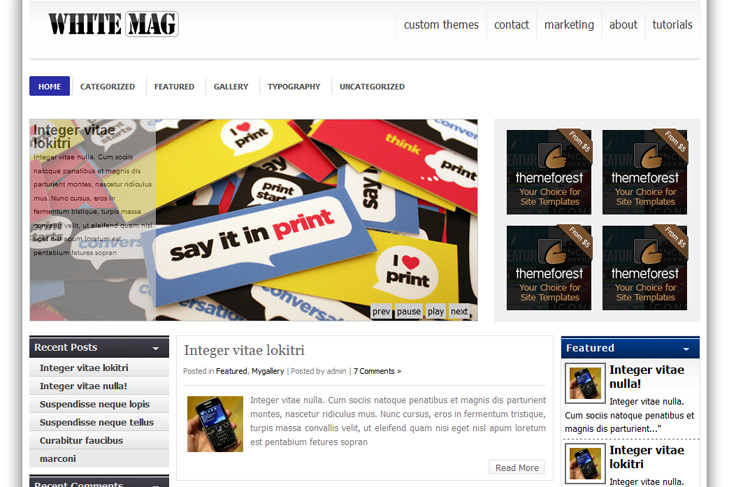
Content slider built in
4 125 x 125 custom banner slots
Banner positions can be turned off
Cross browser compatibility IE7, IE8, Firefox, Safari, Chrome, Opera
Admin Page Options
3 Columns
Collapsibile content column (resized if latest categories turned off)
Left Sidebar
Pages menu
Exclude pages menu option
Category menu
Exclude category menu option
Threaded comments, Trackbacks & Pingbacks are separated
Gravatar ready
Valid CSS and XHTML
Latest articles on category (can be turned off)
Page navigation included, no plugin required
Google Analytics code script can be inserted
Widget ready
Clean coded
Easy to customize
WP 2.9.2 ready
Tags: 3 columns, analytics ready, banners ready, collapsibile column, content slider, gravatar ready, latest on, left sidebar, page navigation, theme options, threaded comments
Posted in Uncategorized | Posted by sin2384 | 2 Comments »
Trying out this “white mag” theme which is beautiful as a live demo, and dont mind the sponsored links. I have a problem with the built in slider and for some reason a picture not showing up, even though i do not think i designated one, in the right sidebar.
I am not sure how to add an image to the slider and why there is a missing image link in the right sidebar. Do i need to add a widget?
Also the Tag cloud is not a cloud just a short list. I am trying this out with a demo blog post which is not mine.
Any help! would greatly be appreciated.
- Anthony
Hi Anthony,
glad you like White Mag. For images in the slider – everything is in the readme file!
“To have an images in the slider, you just add a custom field, type slide and leave link to the image.”
For images in featured categories (its not a sidebar), you have to have images in posts, they are pulled from posts automatically. You can turn it off if you’ll not use it.
I dont know what you mean by “tag cloud is just a cloud just a short list”. What you are trying to do? On demo, we’re using cumulus wp plugin.