






Video Wordpress themes /

Collection of free video wordpress themes

|  

Genesis Framework for WordPress
Cinematic

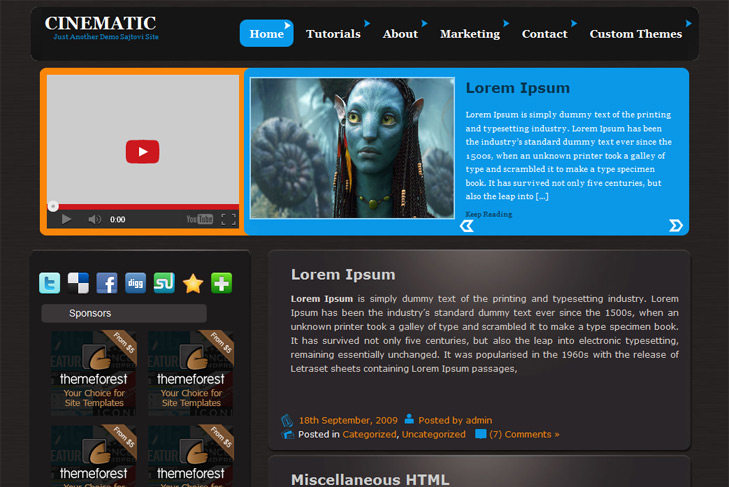
Cinematic free Blog, Movies, Video Wordpress Theme

Best web hosting

Demo Download (3014)

Theme Features:

  1. Content slider built in
  2. Mygallery image slider
  3. 4 125 x 125 custom banner slots
  4. Banner positions can be turned off
  5. Cross browser compatibility IE7, IE8, Firefox, Safari, Chrome, Opera
  6. Admin Page Options
  7. 2 Columns
  8. 2 Sidebars
  9. Pages menu
  10. Exclude pages menu option
  11. Threaded comments, Trackbacks & Pingbacks are separated
  12. Gravatar ready
  13. Featured video (can be turned off)
  14. Social ready
  15. Valid CSS and XHTML
  16. Page navigation included, no plugin required
  17. Google Analytics code script can be inserted
  18. Widget ready
  19. Clean coded
  20. Easy to customize
  21. WP 2.9.1 ready

9 Responses to Cinematic

  1. Hank Spooner on:

    First of all this template is really great. Thank you for your work!
    But i have a question: How I can put the related article pictures in the content slider?
    And the pictures in the slider at the bottom? I just can see blank borders :(

    Kindly Regards
    Hank

    • sin2384 on:

      Hi,

      First, enable custom fields in “Screen Options” at the top right corner!
      To have an images in the slider, you just add a custom field, type slide (lowercase) and leave link to the image. Or check http://www.simplewpthemes.com/howtoslide.png
      to see how it should look like. This should be located under every post once its enabled. But, first of first, you should select sliding category via theme options and number of slides.

      If you want to have small thumbnails in mygallery plugin, you have to type thumbnail (lowercase) in custom field and leave link to the image.
      Also select sliding category for mygallery. Make some “gallery” and “featured” categories for example, and all posts that you want to slide and to be in gallery,
      put in these cats.

  2. Sorry i emailed, i guess i shoulda seen this first, so i’ll ask my question again here so that others who have the same question might be helped.

    I am using this theme, and was wondering if there was a way to get the slider to slide to the next article automatically… say every 15 seconds or so? or at all?

  3. Marc on:

    Can you put a youtube video as the slide image? I would use the featured video, but would like the featured video to be the video of the featured post in the slide.

    Another words, I would like the video to change with the post.

    Thanks for a great theme. :)

  4. billy on:

    could you please explain the size’s uses for the:
    Featured Sliding & Featured Gallery ?

    I’m having a hard time getting these to work.

    • sin2384 on:

      Hi, for the slider is 290×200, and for gallery is 125x190px. You dont have to set exact size here, since images are resized. As there anything else that I can help?

Leave a Reply

Your email address will not be published. Required fields are marked *

*

You may use these HTML tags and attributes: <a href="" title=""> <abbr title=""> <acronym title=""> <b> <blockquote cite=""> <cite> <code> <del datetime=""> <em> <i> <q cite=""> <strike> <strong>

 
Wordpress Hosting

About Us

Simple wp themes is a collection of all wordpress themes made by authors of this site. All themes are free to use.

Latest Tweets

  • Loading Tweets..
Follow us on Twitter

Popular Files

  • U-Design WordPress Theme
  • Modernize - Flexibility of Wordpress
  • Angular - Responsive Portfolio
  • Karma - Clean and Modern Wordpress Theme
  • Scope: Agency / Business WordPress Theme
  • Striking Premium Corporate & Portfolio WP Theme

.